Location Pages: Useful Local Evidence Without Duplicate Templates

A good location page helps someone make a real-world decision: choose the right branch, confirm a service, plan a visit, or find out whether their address is covered.
Location page SEO improves the discovery and clarity of that information. It combines a useful page, sensible navigation, accurate local facts, and maintenance after publication.
The biggest mistake is creating a page for a place before deciding what the page can actually tell the reader. Changing a city name in generic copy does not create a new answer.
This guide uses IKEA’s public US pages to show how location formats, operating hours, and pickup instructions can change a customer’s decision. It also provides a page brief and a lifecycle checklist you can use without inventing local details.
1. Decide whether the page deserves its own URL
Define what the location represents before planning keywords or copy.
| Page type | What it represents | Information the visitor needs |
|---|---|---|
| Store or office page | A real customer-facing place | Address, hours, access, specific services, contact |
| Service-area page | A genuinely supported coverage area | Coverage boundaries, available service, conditions, inquiry route |
| Location hub | A choice between real locations | Browseable links, formats, meaningful differences |
| Regional guide | A distinct local question | Original expertise or evidence that answers that question |
A service-area page must not imply that the business has an office where none exists. Similarly, a pickup point should not be presented as a full store if visitors cannot browse the same range or receive the same services there.
Use this decision test: Can someone finish a location-specific task on this page that would be harder on the general page?
A real branch normally has distinct operational facts. A service area may deserve a page when coverage, scheduling, delivery conditions, or local work changes the answer. Several areas with identical coverage and no meaningful distinctions may be better explained together.
Look at current search results for the proposed service and area, but interpret them as evidence of page types and questions. Do not conclude that a city deserves a page simply because a competitor made one. You also need the facts and capacity to maintain it.
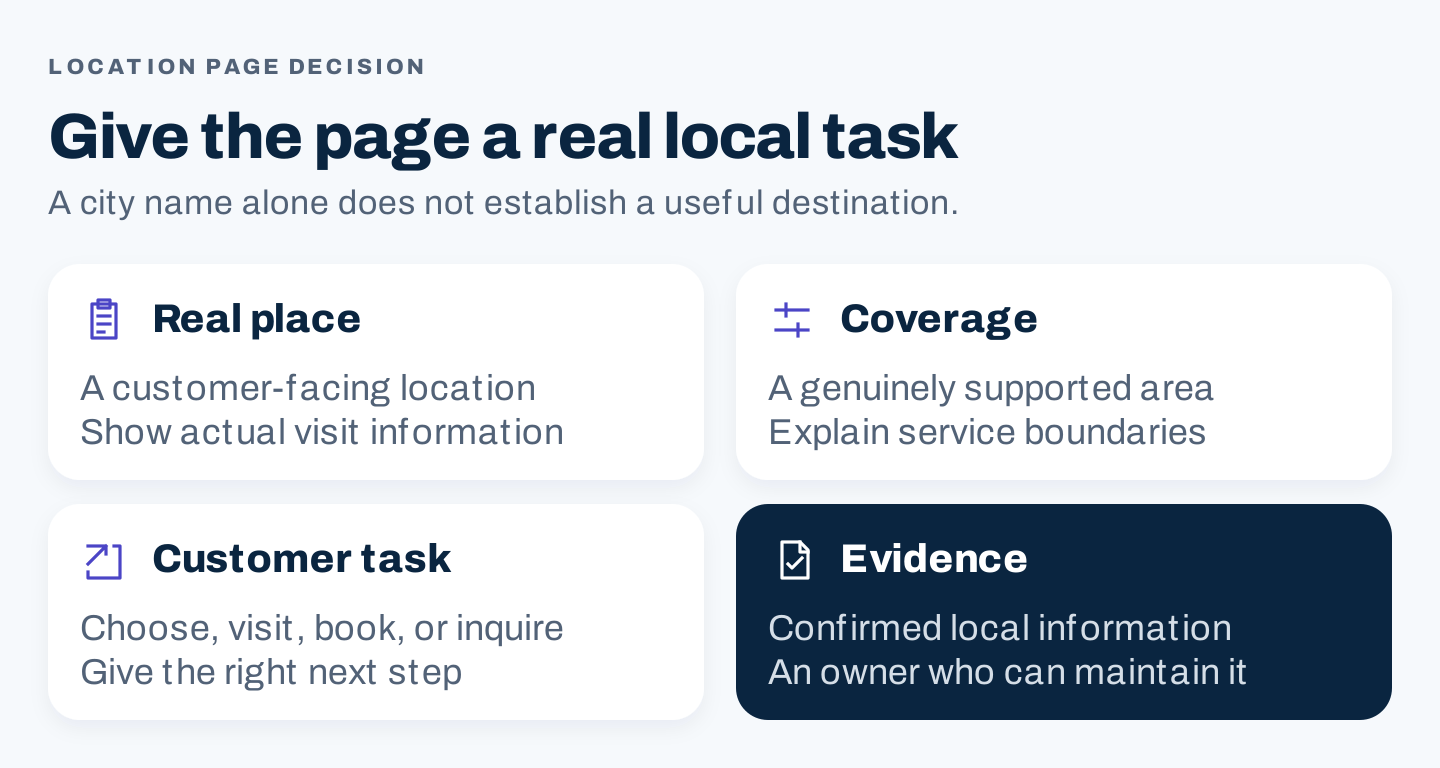
Decide what the page represents and what the customer can do before deciding how much copy to write.
Your website structure and Google Business Profile eligibility are separate decisions. Google’s business representation guidelines distinguish storefront and service-area situations. A new website URL does not establish a new eligible business location.
2. Three lessons from IKEA’s US location pages
These are observations of public content, not an audit of IKEA’s rankings or a recommendation to reproduce its design.
Label the kind of location
The IKEA US directory identifies different formats, including stores, small stores, and plan-and-order points with pickup.
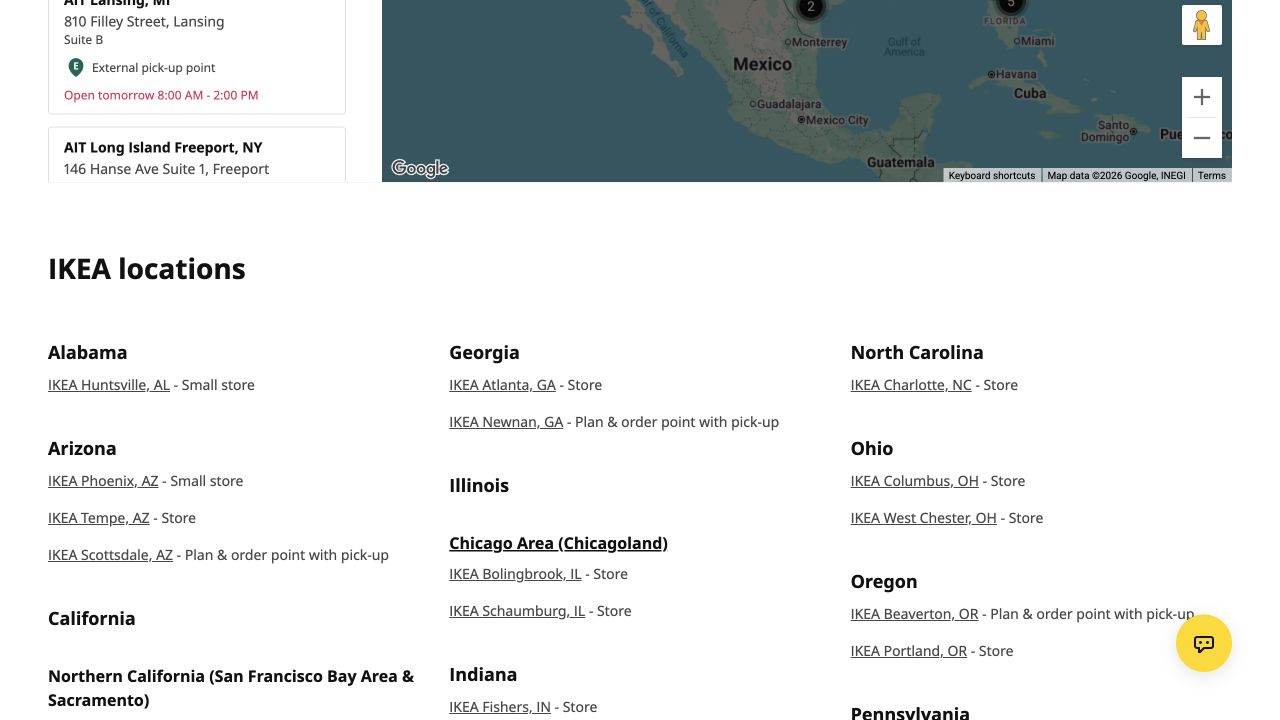
Location labels help visitors understand what kind of destination they are choosing. The directory and formats may change after this October 8, 2026 capture.
That distinction is useful before someone visits. The nearest location is not necessarily the right location for their task.
For your business, identify the differences that matter: showroom versus collection point, appointment office versus walk-in service, or branch with a specialist service versus a standard branch. Use the business’s actual terminology and explain unfamiliar labels.
A directory needs more than names. Give visitors a route to the information that settles their choice, and make individual destinations reachable through ordinary links.
Separate hours for different services
The IKEA Burbank page lists the address and distinguishes store, Click & Collect, restaurant, and other operating information. Holiday closures and special hours are also identified.
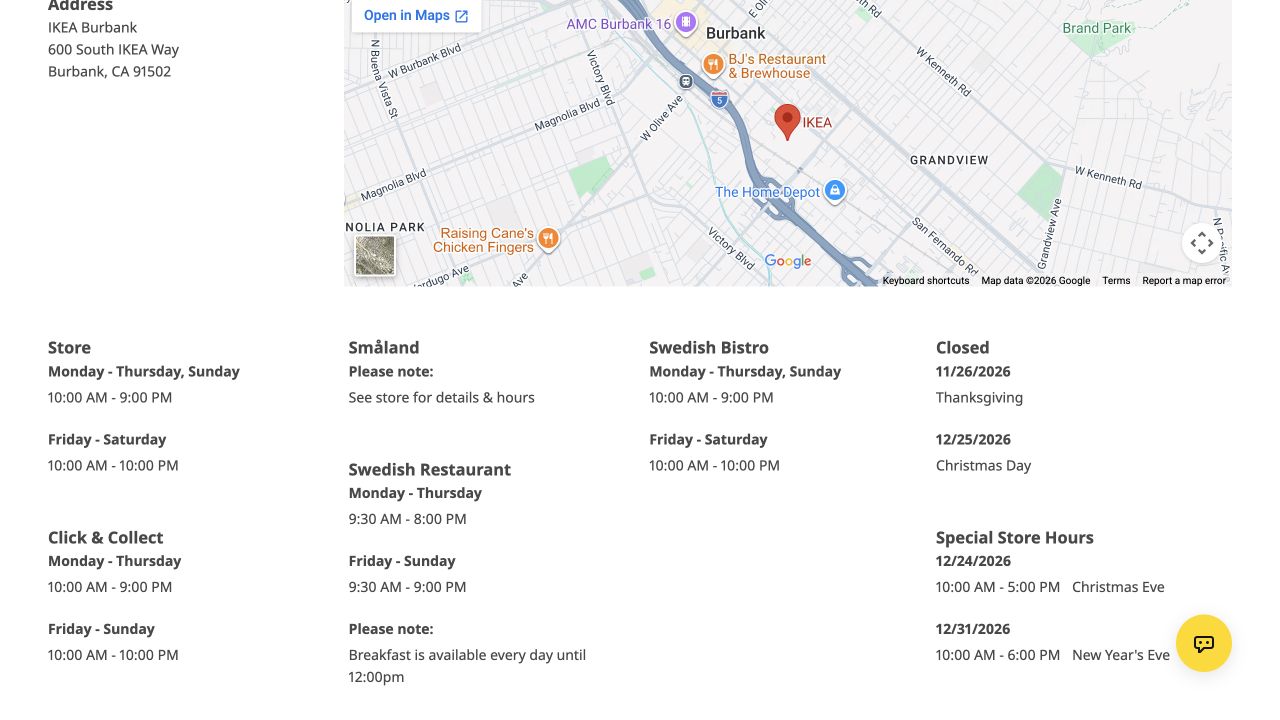
One “open” label may not answer every customer’s question. Separate service windows and exceptions make the distinction visible.
The lesson is the information structure, not the exact schedule. Copying hours from this screenshot would create a maintenance problem. Check the live source for a current visit.
On your own page, ask whether reception hours, appointment availability, collection times, and service deadlines differ. Do not display them as interchangeable.
Explain the last part of the journey
The same page has a Click & Collect section with arrival instructions, signage, an order-desk step, and a local diagram.
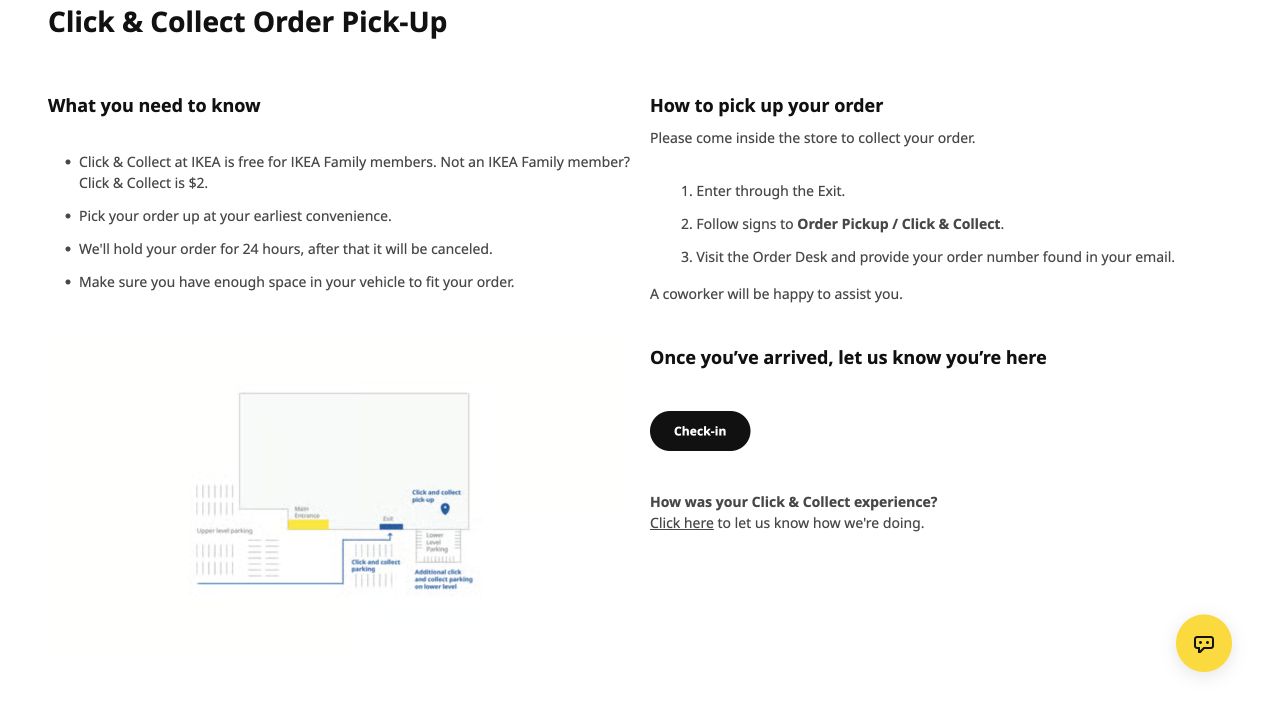
The local instructions answer what happens after arrival. A generic map pin would not communicate the same sequence.
This is the kind of specific information that can justify local content. Your equivalent might be the entrance for accessible appointments, where delivery customers should wait, or how to identify the correct suite.
Collect those instructions from the people who work there. Do not ask a writing tool to infer them from satellite imagery or another branch’s page.
3. Write a local evidence brief before the page
The brief should distinguish verified facts, shared brand information, and unknowns. A blank field is a research task, not permission to generate filler.
Location identifier and public name:
Page type: place / coverage area / hub
Customer task:
Exact address or confirmed coverage:
Service availability and exclusions:
Hours, appointment conditions and exceptions:
Arrival or access instructions:
Correct contact or booking destination:
Useful original images and permission:
Questions customers actually ask here:
Evidence owner and confirmation date:
What is shared with other locations:
What changes this local answer:
Next review and change triggers:
For a physical branch, have the operator check the visit instructions. For a service area, have the dispatch or service owner check the boundaries and conditions. Ask the person responsible for bookings to inspect the destination, rather than assuming the corporate contact form routes correctly.
Use a small evidence hierarchy.
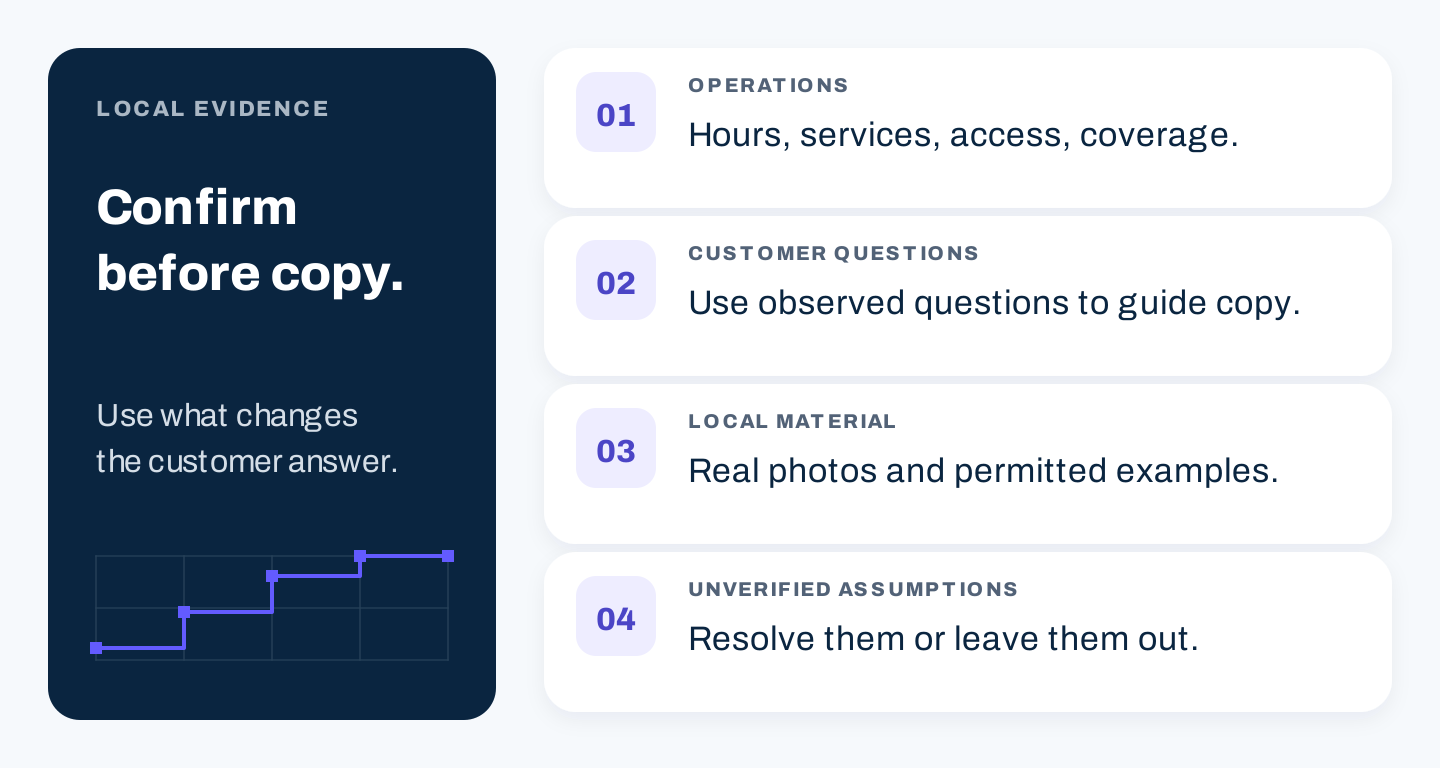
Confirmed operations establish the answer. Customer questions guide its presentation. Unverified assumptions stay out of the published page.
A branch photograph can show what to recognize. A local project example can demonstrate relevant work, provided the customer’s permission and the facts are confirmed. A testimonial can explain a genuine experience, but should not be relabeled as coming from a different branch.
Avoid universal promises such as same-day availability unless the business can verify the conditions and keep the statement current. If schedules change frequently, explain how to check availability rather than publishing a static guarantee.
4. Build the page around the customer’s task
A practical physical-location page can follow this order:
- Identify the location and the service it provides.
- Show the address, hours, exceptions, and relevant contact.
- Explain how to arrive or arrange the service.
- Describe the services that actually differ at this location.
- Add specific evidence and answers to local questions.
- Offer the appropriate next action and nearby alternatives where useful.
The order can change when the business is appointment-led or serves customers at their addresses. The principle is to answer the immediate decision early.
Reuse the layout across pages. Common brand explanations can also remain common. Spend the writing effort on the facts and questions that change locally.
There is no useful requirement that half the text must be unique, every page must have a certain length, or every city must have its own testimonial. Such quotas encourage padding when the customer needs a short operational answer.
For a service area, replace visit instructions with accurate coverage information. Explain what the person needs to provide to check service, whether the entire area is covered, and any relevant exclusions. Do not expose a private residential address to manufacture an office impression.
For FAQs, favor observed questions. “Where do I collect my order?” may help. “Why is this city a great place to live?” usually belongs elsewhere, if anywhere.
Choose visuals by purpose. A real storefront photo, pickup diagram, or verified coverage map can explain something concrete. An AI-generated city skyline cannot prove a branch exists or show the correct entrance.
5. Make the page reachable and technically coherent
Create a stable, readable URL and link it from the location hub. Link relevant service pages where those explanations help the reader. A good page should remain understandable when opened directly.
Give the technical owner a checklist tied to the actual URL:
| Check | Question to resolve |
|---|---|
| Navigation | Can a visitor reach this location without relying only on internal search? |
| Rendered content | Are the essential local facts available in the page as users and search engines receive it? |
| Indexing controls | Is any exclusion intentional, and does it match the page’s purpose? |
| Canonical treatment | Are duplicate URLs being distinguished from genuinely different locations? |
| Links and actions | Do directions, phone, contact, and booking lead to the correct place? |
| Mobile layout | Are service windows and buttons usable on a narrow screen? |
Do not automatically canonicalize every branch to the corporate homepage. That would fail to represent the purpose of distinct local pages. When a duplicate URL exists, have the technical owner choose the appropriate consolidation treatment for that duplicate.
An authorized owner can use Search Console URL Inspection to examine indexing information and live accessibility. Treat it as a diagnosis tool, not a promise that a tested page will appear in search.
If the page represents an appropriate business location, review Google’s LocalBusiness structured-data documentation. Markup should reflect the actual page and satisfy the current requirements. It does not turn an invented office into a real one or guarantee enhanced search appearance.
Keep the page’s address and hours consistent with the business’s maintained records. Structured data should not become a second, forgotten copy of operational facts.
6. Plan for openings, moves, and closures
Location pages are operational assets. Their most damaging errors often appear after the initial writing is finished.
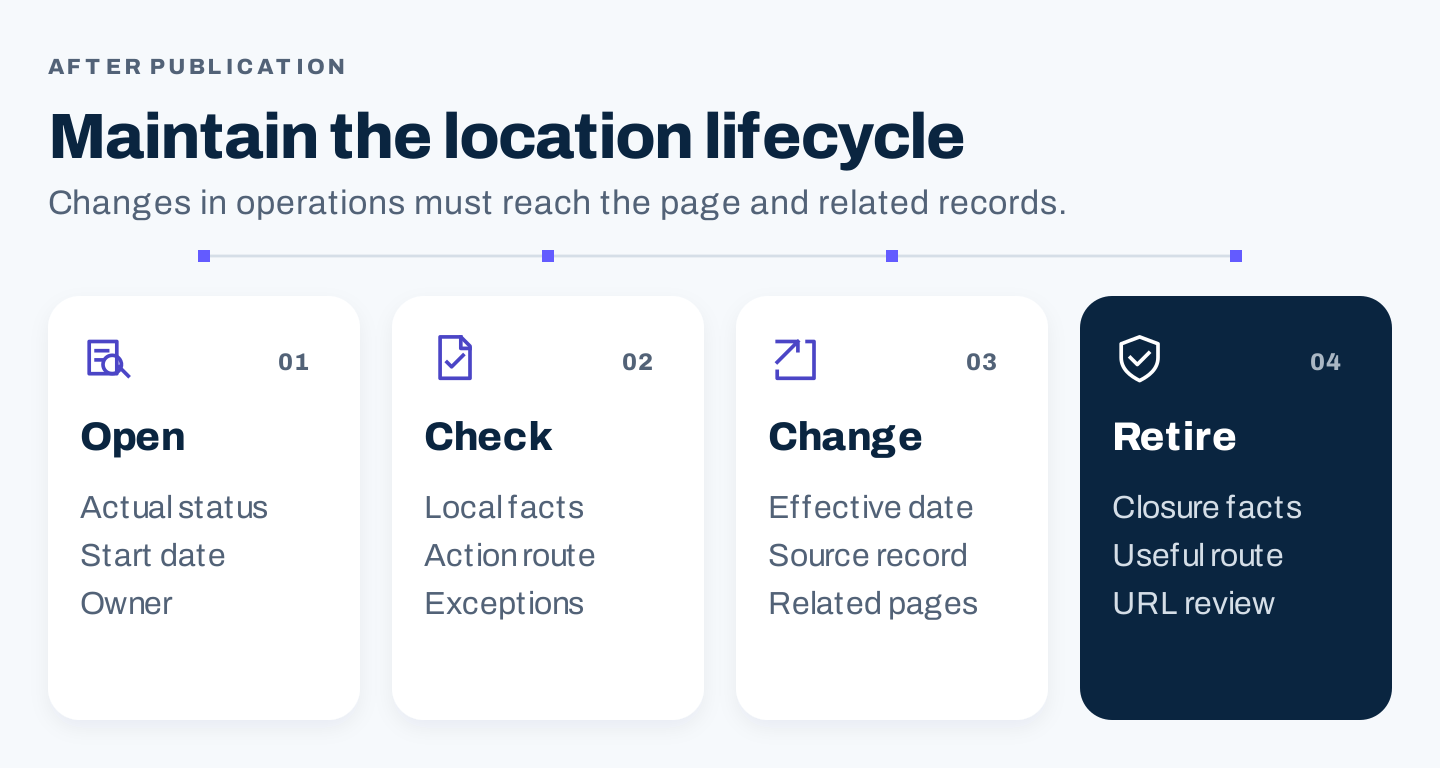
A page needs a process for changing facts and retiring obsolete information, not only a publication date.
For an opening, confirm the announced date, current status, and which services will actually be available. Distinguish a forthcoming location from one customers can use today. Assign someone to check the page when opening plans change.
For a move, record the old and new address, effective date, arrival instructions, contact routes, and profile changes. Decide whether the existing URL remains appropriate or a new destination is needed. Preserve useful navigation and help previous customers find the new place.
For a temporary closure, say what is unavailable, when the notice was confirmed, and how the customer can obtain a current answer. Do not hide the change inside a long paragraph of unchanged promotional copy.
For a permanent closure, assess what the former page still needs to explain. A closure notice, a genuinely relevant replacement, or removal may be appropriate depending on the situation. Ask the technical owner to choose the URL and status treatment; sending every closed location to an unrelated branch can confuse visitors.
Use an update record:
Location and exact page URL:
Change / effective date:
Confirmed by / evidence:
Visible page updated:
Related directory and profile updated:
Markup or other duplicated facts checked:
Contact and direction routes checked:
Old information or links still needing attention:
Next check / accountable owner:
Prioritize changes that could cause a wasted visit, an incorrect booking, or an unsupported service promise. Cosmetic wording can wait when critical operating information is wrong.
7. Measure whether the page helps the local task
Track search visibility for the specific destination and record the actions the page is designed to support. Examples include contact clicks, booking starts, completed appointments, or service-area inquiries, depending on reliable collection.
Separate those measures. A phone-link click is not a completed conversation. A completed form is not necessarily a qualified inquiry. Directions usage does not prove a customer arrived.
Review unanswered questions as well as counts. Staff may repeatedly have to explain a pickup entrance that is absent from the page. That is an actionable content problem even if the page receives few organic visits.
Test one or two locations before a wide rollout. Confirm the factual process, mobile layout, link behavior, and update ownership. Expand once the business can maintain the answers.
Common location-page questions
Is duplicate layout bad for SEO?
A repeated layout can help consistency and usability. The concern is whether the page supplies a useful answer for its purpose. Google’s spam policies address doorway abuse and scaled low-value content; they do not supply a safe percentage of reworded text.
Should we build a page for every nearby city?
Only when you genuinely serve it and can explain a distinct, useful local task. A maintained coverage page may be clearer than many interchangeable pages.
Can AI make the local page unique?
It can help organize confirmed material. It cannot establish local services, accessibility, opening hours, or customer experience. Changing phrasing around unverified claims does not solve the evidence problem.
Start with the customer’s real question. Collect the facts that change the answer, make the destination reachable, and keep it accurate after launch.