FAQ Pages and FAQ Schema: Useful Answers and Current Eligibility

A useful FAQ page answers recurring questions and helps people take the next step. Start with questions your customers actually ask, place the answers where they need them, and maintain the facts behind those answers.
For SEO, the current Google status matters: FAQ rich results stopped appearing from May 7, 2026. Google removed the feature’s documentation on June 15, 2026. Older advice about qualifying government or health sites no longer describes an available FAQ rich-result opportunity. Google’s documentation update log records both changes.
That does not make your answers unnecessary. It changes the reason for building them. The strongest case for an FAQ is that it resolves a real question, supports navigation, or prevents confusion about a product, service, or policy.
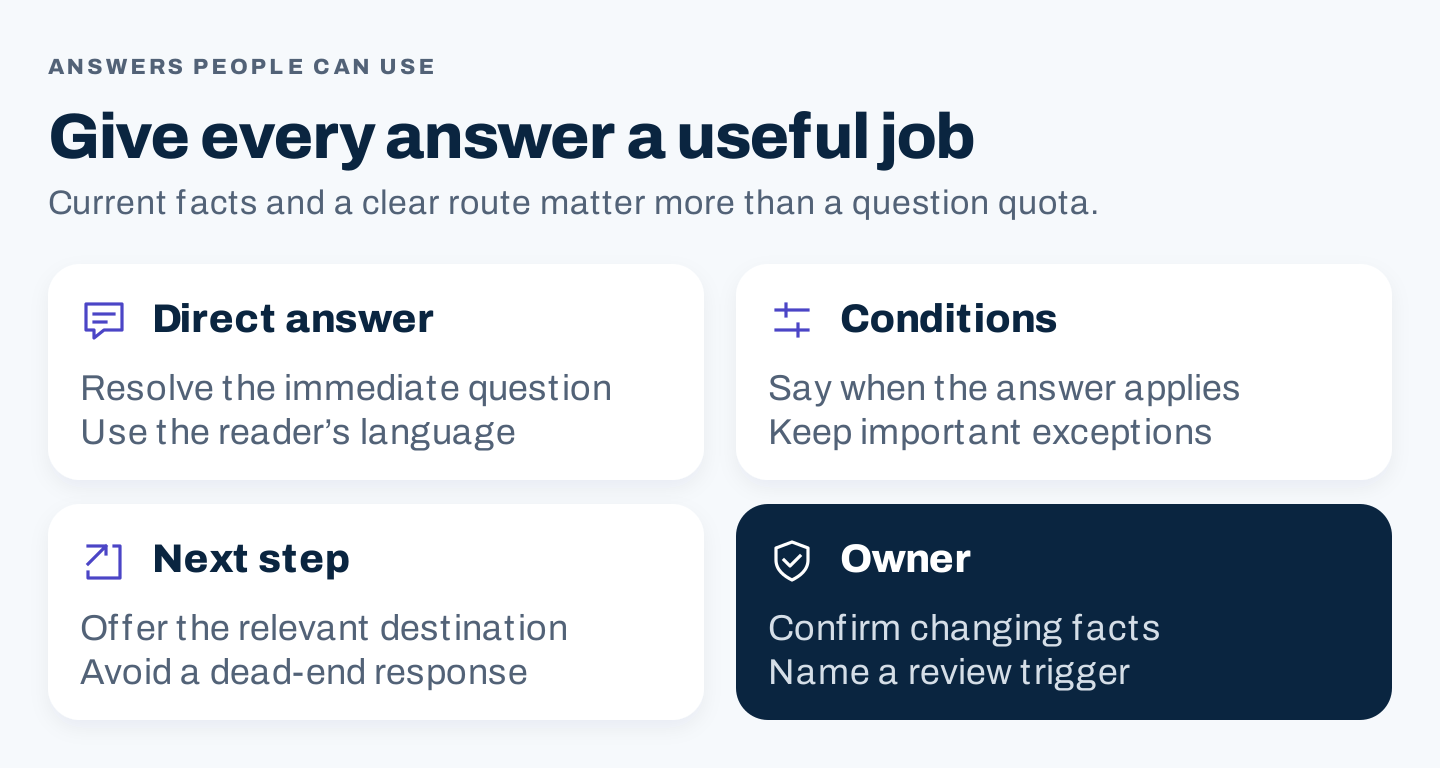
Original answer framework: state the answer, preserve its conditions, provide a useful route, and assign someone to maintain it.
1. Update the FAQ schema decision for 2026
An FAQ page, a vocabulary type, and a Google search feature are different things.
| Item | What it means | Current implication |
|---|---|---|
| FAQ content | Questions and answers visible to readers | Build it when it helps with real tasks |
| Schema.org FAQPage | A vocabulary type for a page presenting frequently asked questions | Its existence does not establish a Google display benefit |
| Google FAQ rich result | A former enhanced presentation in Google Search | No longer shown from May 7, 2026 |
The Schema.org FAQPage definition remains available. A vocabulary can exist even when a particular search engine no longer displays a feature associated with it.
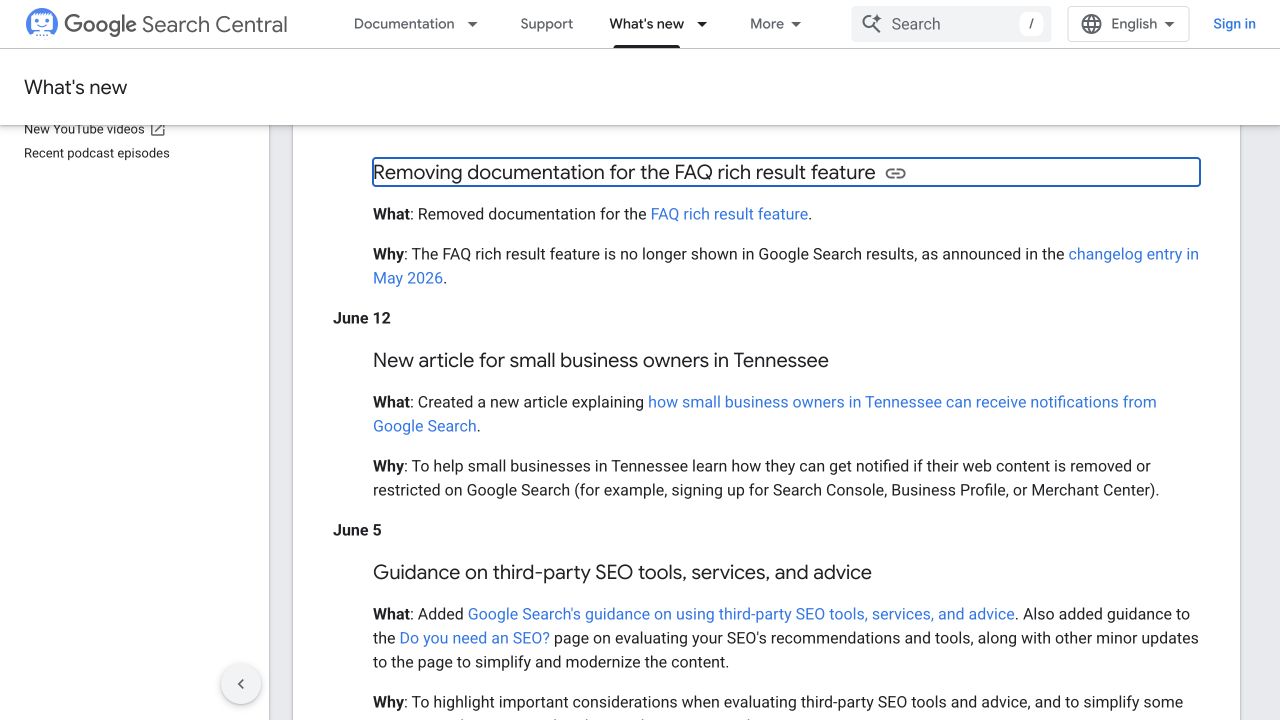
Google’s June 15, 2026 update explains that the FAQ rich-result feature is no longer shown. Captured from the official update log on October 8, 2026.
What to do with existing markup
Inventory where FAQPage markup is generated and why. If its only intended benefit was the retired Google feature, stop treating it as a mandatory optimization task. If another system consumes it, document that actual use before changing it.
Do not delete useful visible answers just because the search feature has ended. Also avoid replacing the type with another one solely to recover an enhanced display. The content and the consuming platform’s current requirements should determine any markup choice.
Keep structured data accurate if you retain it. Check that the generator reflects the current visible questions and answers rather than an old version of the page. A syntactically valid record cannot establish usefulness or a display benefit.
Separate other search outcomes
An ordinary result link, a People Also Ask answer, and an AI citation are separate outcomes. FAQPage markup does not establish eligibility or guarantee appearance in those surfaces.
Google’s generative AI guidance connects its AI features with foundational SEO and useful original content. Write answers that work for people and evaluate visibility separately, using actual observations and their collection context.
2. Match the FAQ format to the question
A small set of purchase questions, a support library, and a policy explanation need different structures. These three public examples show useful distinctions. They are observations of page design, not evidence of conversion gains or rankings.
Airbnb: route several audiences to relevant help
The Airbnb Help Center combines a search field, role tabs, task articles, and a contact route. A guest and a host do not necessarily need the same answer, so the audience distinction appears early.
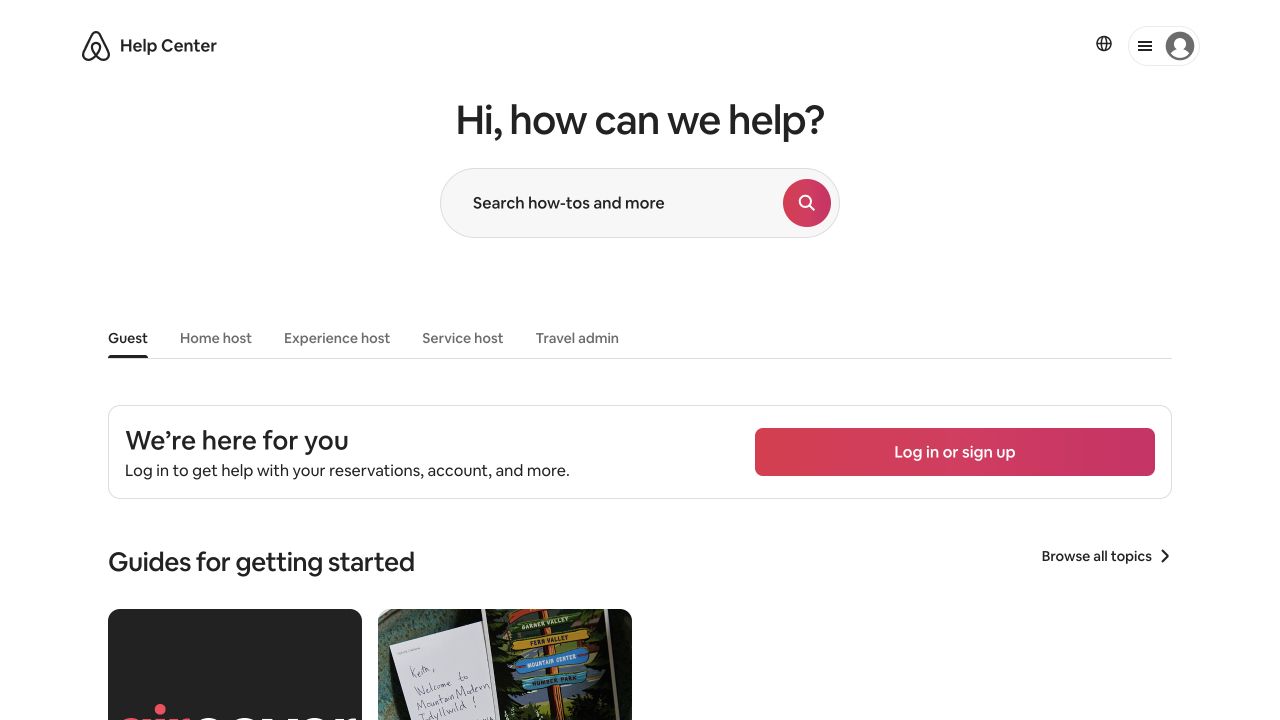
Airbnb’s public help center separates audiences and offers task destinations. A large question library needs routing as well as answers.
Use this pattern when your organization serves groups with materially different tasks. A software company might separate account administration from everyday use. An agency might separate prospective-client questions from onboarding instructions.
The lesson is to establish a useful route. It is not a requirement to build a large help center when five clear answers would suffice.
Spotify: answer questions beside a specific offer
Spotify’s US Premium Duo page includes focused question buttons. Opening the account-sharing question reveals an answer about separate accounts. The questions relate to understanding that particular plan.
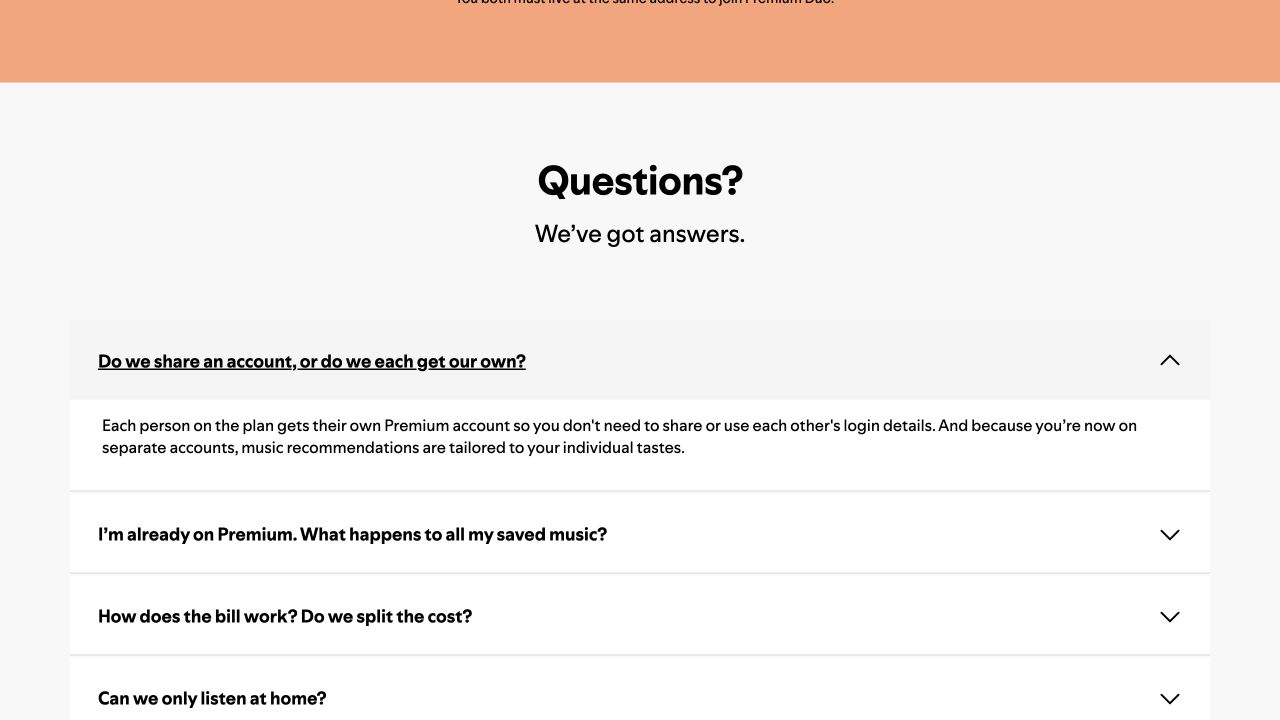
A focused FAQ can sit on the page where the decision occurs. One answer was opened to verify the interaction; this is not a full accessibility or product audit.
Use this pattern when a question affects a specific choice. Put the answer near the relevant offer or service explanation. Sending every reader to a general FAQ hub can add unnecessary navigation.
Keep eligibility and other material conditions near the offer as well. An accordion should not become the only place someone can discover a limitation essential to the decision.
REI: preserve the branches inside a policy answer
REI’s returns page connects policy navigation, process sections, and frequently asked questions. Its expanded proof-of-purchase answer distinguishes purchase channels and provides an assistance route.
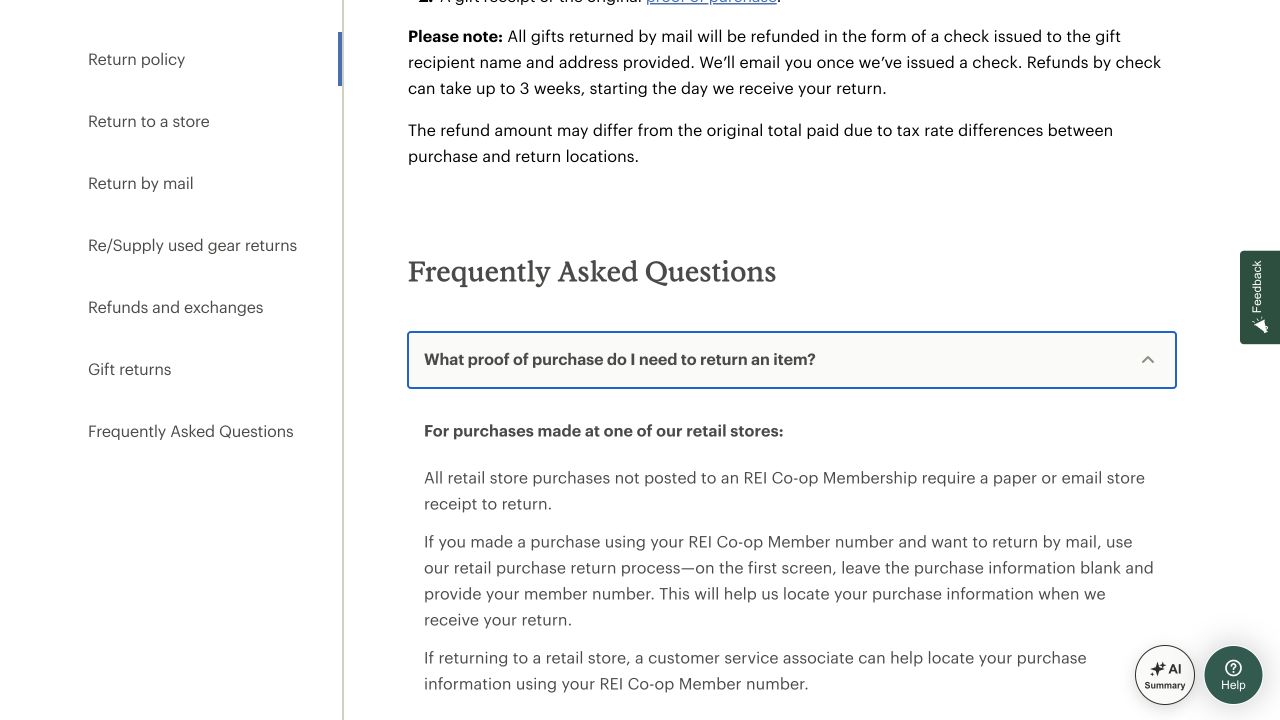
A policy answer may need branches rather than a single universal sentence. REI’s public page shows the distinction and the route for further help.
Use this pattern when the answer depends on how someone purchased, which account they use, or another factual condition. Lead with the relevant distinction, then route the reader to the right process.
Avoid compressing every branch into “yes” or “no.” A short answer that discards an important condition can create more work than it saves.
3. Build a question backlog from actual evidence
Start with support conversations, sales questions, onboarding issues, site-search terms, and feedback on existing resources. Record the language customers use and the context that changes the answer.
Search research can reveal additional phrasing and related questions. Treat those as leads to investigate rather than proof that your audience repeatedly asks them. AI can propose candidate questions, but a generated list is not customer research.
Use a question backlog:
| Field | What to capture |
|---|---|
| Question | The reader’s natural wording |
| Audience | Who asks and what they are trying to do |
| Evidence | Support, sales, search, feedback, or an unvalidated suggestion |
| Consequence | What remains blocked without the answer |
| Conditions | Facts that change the response |
| Answer source | The person or record that can confirm it |
| Destination | In-page answer, focused FAQ, guide, policy, or support route |
| Owner and trigger | Who maintains it and what should prompt review |
An owner or small team can begin with a single page and a handful of verified questions. A marketing team can combine question evidence across departments. An agency should have the client confirm policy and operational answers before writing them into public content.
Prioritize questions by their effect
Give priority to questions that block a decision, affect suitability, cause recurring mistakes, or create avoidable support work. Frequency matters, but a less common question with a significant consequence can still deserve a prominent answer.
Separate distinct questions even when they share words. “How do I change the appointment?” and “What happens if I miss it?” may need different actions and conditions. Combine duplicate wording only when the underlying task and answer are actually the same.
Do not pad the backlog with every imaginable query variation. One maintained answer can handle several natural phrasings without creating a separate page for each.
4. Write answers people can act on
Use a simple answer structure: direct response, applicable conditions, useful next step, and a source or owner for changing facts.
The direct response should resolve the immediate question. The next sentences explain what changes the answer and how the reader proceeds. Link to a detailed procedure when the task needs more than a short response.
Here is a copyable answer brief:
Question in the reader's wording:
Audience and task:
Direct answer:
Conditions and exceptions:
Useful next step or detailed destination:
Source or operational owner:
Date confirmed:
Trigger for reviewing the answer:
For a policy question, confirm the answer with the person responsible for the policy. For a product question, preserve device, plan, permission, or setting distinctions. For a service question, make sure the answer describes what your team can actually provide.
Keep promotion subordinate to the answer
An FAQ answer can explain a relevant benefit, but it still has to answer the question. A response about cancellation that only describes how much customers love the service fails the task.
Use neutral, specific language. Avoid guarantees that the source cannot support. If there is no universal answer, explain the deciding condition or provide a route to the person who can resolve the case.
Give longer answers a stable destination
If a question requires a substantial procedure, comparison, or policy explanation, create or use a suitable resource. The FAQ can give the immediate orientation and link to that destination.
Maintain one authoritative version of changing facts. Repeating a detailed policy across multiple articles creates more places that can become inconsistent. Short contextual summaries can link to the source of truth and remain useful.
5. Make the navigation and controls usable
Group questions by reader task. Labels such as billing, getting started, account access, and returns work when they match the questions in those groups. A long “general” category often needs more meaningful distinctions.
For a small FAQ, open text may be sufficient. For a larger one, headings, jump links, search, and focused resources may help. Add an accordion when collapsing sections improves use, then check the actual implementation.
The W3C accordion pattern describes heading buttons, panel relationships and expanded states, along with Enter/Space and Tab behavior. Use it as implementation guidance and verify the controls in the finished page.
Check that:
- Question controls can be reached and operated with a keyboard.
- The current expanded state is communicated.
- The visible question, answer, and related links remain readable on a phone.
- Links inside answers can be followed without losing the question context.
- A link to a particular answer reaches a useful state when the page loads.
- Essential eligibility or policy information is not obscured by the layout.
A public example’s polished appearance does not establish that it passes those checks. Test your own implementation.
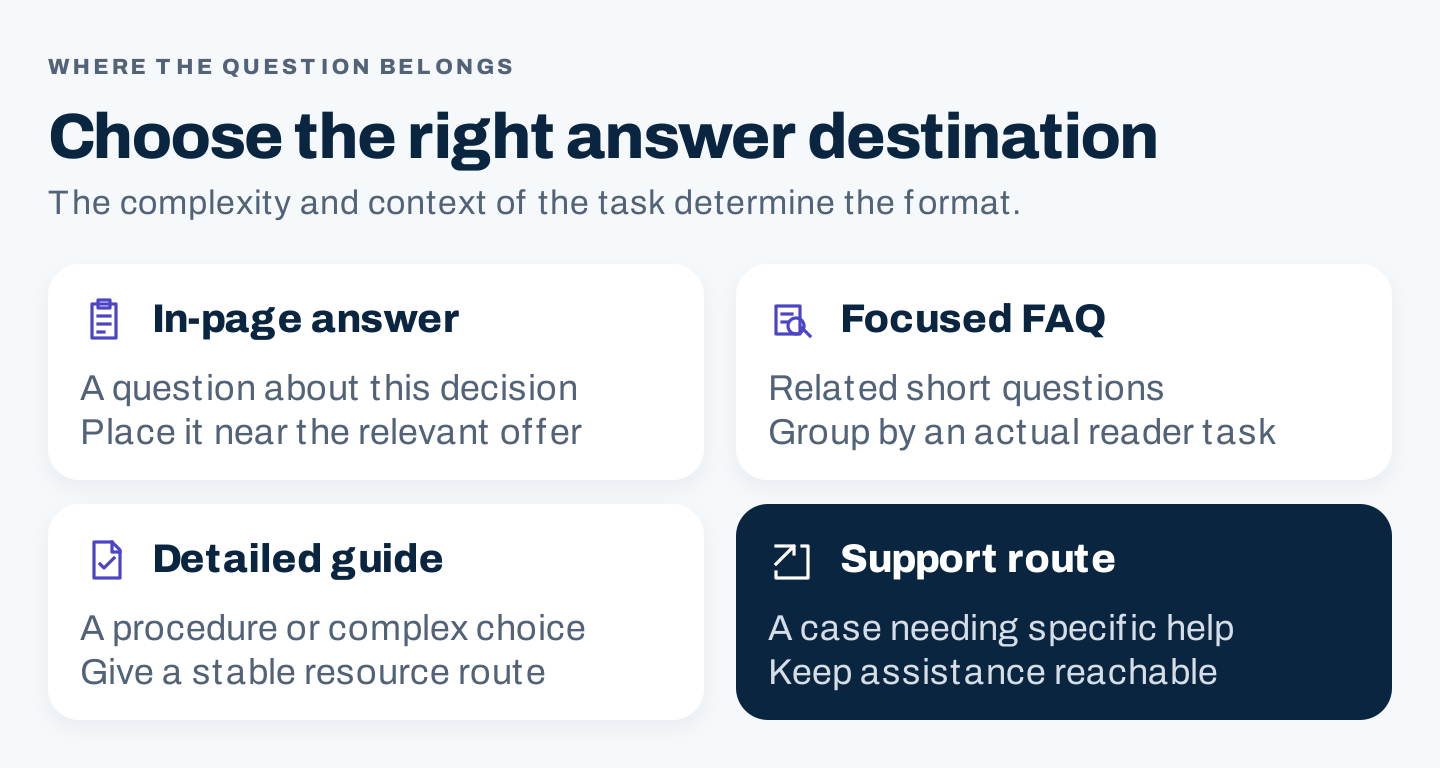
Original routing framework: place short contextual answers near the decision, group focused questions, use detailed guides for procedures, and retain a support route for unresolved cases.
Include the answer in real page content rather than in an image alone. Use screenshots or diagrams when they explain a procedure or distinction that words cannot show as efficiently. Decorative question-mark graphics rarely add evidence.
6. Maintain answers when the underlying facts change
Assign an answer owner and a review trigger. A price, service boundary, product setting, or operational policy can change before a scheduled editorial review.
Maintain a simple release record:
Question or resource changed:
Underlying fact and effective date:
Source or owner who confirmed it:
Pages or answer variants affected:
Visible content changes:
Structured-data changes, if retained for a documented purpose:
Links and controls checked:
Next review trigger:
Update all affected destinations together. A correct FAQ that contradicts the service page still leaves the reader with a problem.
Choose measurements that fit the FAQ’s role. Useful observations can include site-search questions, failed searches, visits to detailed instructions, and feedback about unresolved tasks. For a commercial page, track suitable next actions separately from opening an answer.
An accordion click is not proof that a question was resolved. Fewer support contacts are also ambiguous: people might have found the answer, or they might have struggled to reach support. Interpret the numbers alongside feedback and actual task checks.
Questions about FAQ pages and schema
Can an FAQ page still appear in ordinary Google results?
The retired feature concerns FAQ rich results. A page with useful FAQ content can still be considered as an ordinary web page. Google’s Search Essentials apply, and eligibility does not guarantee indexing or display.
How many questions should we include?
Include the recurring or consequential questions within the page’s scope. Use another destination when an answer deserves a detailed resource or belongs to a different audience. There is no need to reach a fixed question count.
Should every blog post end with an FAQ?
Only when the questions add useful answers that belong to the article. Remove questions already answered clearly in the main body, or integrate their answers where the reader needs them. An FAQ section should earn its place through usefulness.