AI Social Media Automation: From Brief to Scheduled Posts
Build AI social media automation in eight stages, from accepted source to verified queue. Includes channel drafts, prompts, version records, and tests.

AI social media automation connects content preparation with repeatable publishing work. AI can help turn an accepted source into channel drafts, while a publishing tool manages the queue and schedule. The workflow is complete when the intended version reaches the right account at the intended time.
Start with one source, a small set of channels, and a defined reviewer. Expanding output before establishing those controls creates more posts to correct.
Rankauto publishes this guide. We reviewed the linked public pages on October 15, 2026. The channel drafts are original illustrations based on Buffer's published announcement, not posts approved or published by Buffer.
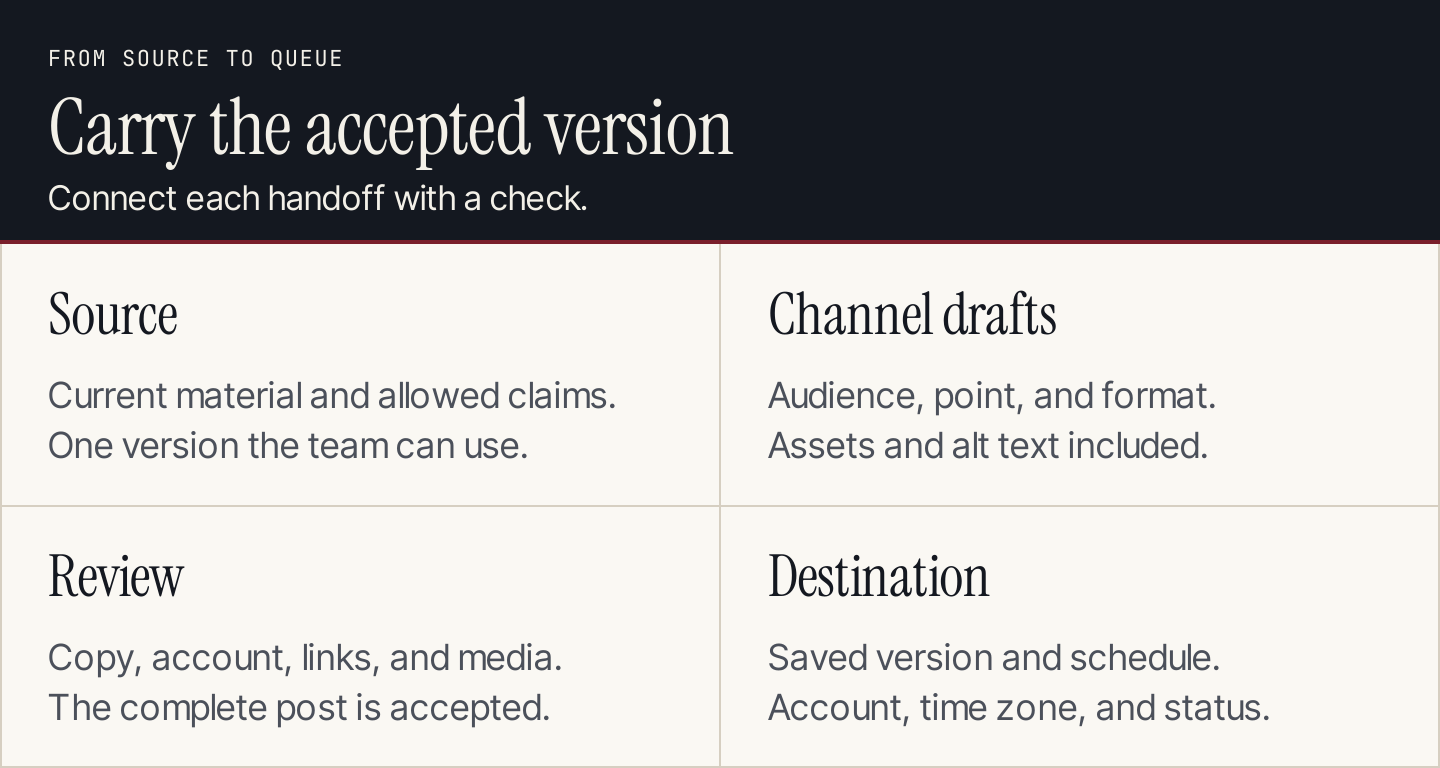
Carry the accepted version through drafting, review, and the publishing queue.
What should you automate?
Separate the jobs before selecting tools:
| Job | AI's contribution | Publishing system's contribution |
|---|---|---|
| Planning | Suggest angles from an accepted source | Maintain dates, owners, and status |
| Drafting | Adapt an explanation for a channel | Store the draft and attachments |
| Review | Flag unsupported claims and missing requirements | Apply the configured review process |
| Scheduling | Help prepare the requested time and channel | Save the post to the chosen account and slot |
| Reporting | Summarize defined observations | Return the underlying post and performance data |
An AI assistant does not gain access to your accounts because you describe this process. A connector, API, or supported integration must provide the required capabilities.
Buffer's beginner AI social guide introduces five steps for using AI in social work. The eight stages below extend the workflow through source control, destination verification, and failure handling. Use the broader content distribution plan to choose which channels deserve the effort.
1. Accept a source before adapting it
Choose a published article, approved announcement, interview transcript, or another source the team can use. Record its version and the claims that may appear in social posts.
For this walkthrough, the source is Buffer's API announcement. It introduces an API and describes an MCP server and command-line tool for working with Buffer. We will adapt that topic without carrying over customer growth claims or suggesting that the drafts were tested.
Create a source brief:
| Field | Walkthrough entry |
|---|---|
| Topic | Connecting publishing work with Buffer's API and related tools |
| Audience | Marketing teams evaluating connected publishing workflows |
| Accepted claims | The announcement introduces API, MCP, and CLI routes |
| Destination | The published Buffer announcement |
| Exclusions | Customer results, universal client support, setup-time promises |
| Review requirement | Confirm current access and integration details before release |
A source brief makes the adaptation task smaller. It also gives the reviewer a way to spot facts introduced during rewriting.
2. Write a brief for each channel
Use the content repurposing guide for adaptation choices and the content calendar for dates and owners. The UTM builder helps prepare campaign links for each channel.
Specify the reader, the point of the post, the format, and the next action. The same source can support different explanations without repeating identical text everywhere.
For example, a LinkedIn post can explain the workflow choice. A short text post can focus on the difference between drafting and scheduling. A carousel can show the handoffs as a sequence.
Choose formats because they suit the message and the team's production capacity. A carousel requires designed slides, alt text, and review; a text draft alone is not a finished carousel.
3. Generate channel drafts from the brief
These original drafts illustrate the adaptation task. They contain no measured performance claims.
LinkedIn draft: explain the decision
A connected social workflow needs more than a writing prompt.
Buffer's API announcement introduces API, MCP, and command-line routes for working with its publishing system.
Before choosing a route, map the job: where does the accepted content come from, who reviews it, and which account receives the scheduled post?
Start with one source and one destination. Check the saved post before adding more channels.
Read Buffer's announcement for the available routes.
Short text draft: isolate one lesson
A draft in a chat is not yet a scheduled social post. Buffer's API announcement is a starting point for exploring connected publishing. Define the review step and verify the destination before expanding the workflow.
This can become a Threads post after checking the account's current composer and link behavior. A character limit is a format constraint, not an instruction to remove qualifications that make a claim accurate.
Carousel brief: show the handoffs
| Slide | Message | Visual direction |
|---|---|---|
| 1 | Map the social publishing workflow | A compact source-to-post sequence |
| 2 | Start from accepted material | Source title, version, and allowed claims |
| 3 | Draft for the channel | One message shown in two formats |
| 4 | Review the whole post | Copy, attachments, links, and account |
| 5 | Verify the saved destination | Queue record, time zone, and owner |
| 6 | Explore Buffer's connection routes | A source link and clear next action |
This is a production brief, not a claim that slide images have been created. Before publishing a carousel, the team still needs to build and inspect the assets.
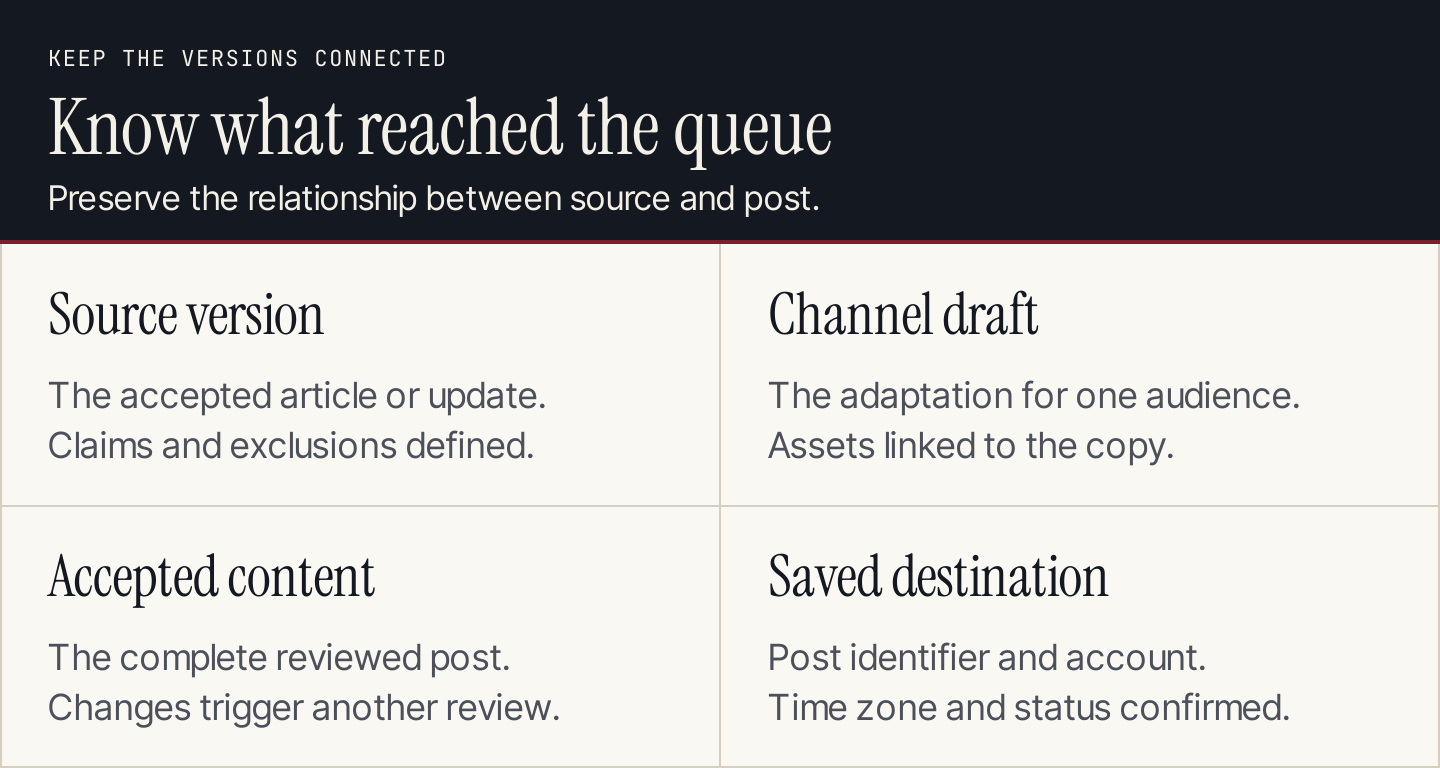
Keep the source version connected to the version accepted for each channel.
4. Prepare the assets and accessibility text
Select screenshots, charts, or designed graphics that support the message. Check the crop at the size it will appear in the feed. A full desktop screenshot often becomes unreadable when reduced to a phone-width card.
Write alt text describing the information a reader needs. If the visual contains essential instructions, include those instructions in accessible text as well. Review video captions and on-screen text against the accepted source.
Keep a filename and version for every attachment. If the copy changes after an image is approved, inspect the pairing again. A corrected price in the caption does not correct an outdated price embedded in a graphic.
5. Review the complete post
The reviewer should see the channel, account, copy, attachments, destination link, and proposed release time together. Checking only the text hides mistakes that happen during assembly.
Use a short acceptance rule: claims match the source; qualifications remain; links work; assets are readable; the post suits the account; and the next action is clear.
A model can help flag issues, but it cannot approve its own assumptions. Ask it to identify what it cannot verify rather than silently filling gaps.
Adapt only this accepted source: [text and URL].
Channel, audience, and format: [brief].
Allowed claims: [list].
Excluded claims: [list].
Brand voice and required destination: [reference].

Return a draft, attachment requirements, and unresolved questions.
Preserve qualifications and do not invent results or testimonials.
Do not schedule or publish. A reviewer must accept the complete post.
6. Connect the publishing tool and save a draft
Buffer's MCP page describes drafting, scheduling, queue management, and related work through a connected assistant. The page includes a review-and-publish stage and says MCP is available across its plans, including Free.
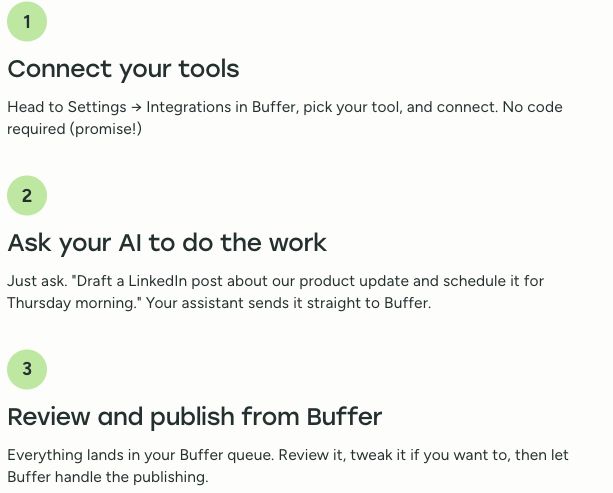
Buffer presents connection, requests, and review as parts of the workflow. Source: Buffer.
Use the current Buffer integration page for its remote connection route rather than copying an older local configuration from an announcement. Connect only the intended workspace and verify which accounts are available.
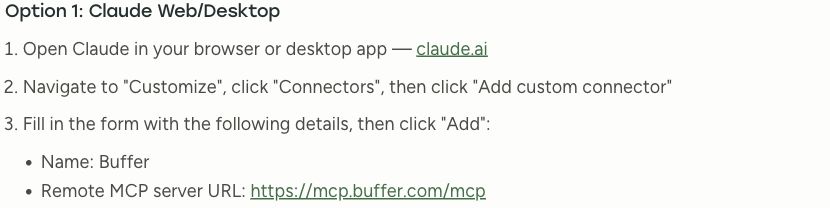
The current integration page describes the connection route. Source: Buffer.
Connection does not establish a universal approval rule. Configure the review behavior your tools support and test it. If the chosen route can schedule directly, keep the initial assignment restricted to creating a draft until the complete post is accepted.
7. Verify the schedule in the destination
Check the queue after saving. Compare the content with the accepted version and inspect account, date, time zone, attachments, link, and status.
Buffer's published Claude walkthrough shows a queue example alongside drafting and scheduling tasks. The queue's named account and time information are part of the confirmation, not decoration.

The destination view helps confirm the account and scheduling context. Source: Buffer.
Maintain this record for each accepted post:
| Field | Why it matters |
|---|---|
| Source and version | Shows which material the post depends on |
| Channel and account | Prevents an otherwise correct post reaching the wrong audience |
| Accepted copy and assets | Identifies what the reviewer approved |
| Scheduled time and time zone | Makes the requested release time unambiguous |
| Destination identifier | Lets the team find the saved post |
| Confirmed status | Distinguishes draft, queued, published, and failed |
| Owner | Identifies who resolves changes or failures |
If a scheduling request returns an error or times out, inspect the destination before repeating it. A duplicate post is a common consequence of retrying an operation whose result is uncertain.
8. Review publication and decide what to reuse
After release, check that the intended post is live and that its link works. Preserve the publication identifier and any platform-reported failure.
Review results against the post's goal. A resource post may aim for qualified visits; an announcement may aim for a defined product action. Keep the date range, audience context, and metric definitions with the report.
AI can group comments or summarize the supplied report, but a theme is not a verified audience-wide preference. Read the underlying comments before changing the plan. Adapt future posts from the lesson rather than automatically repeating the highest-impression wording.
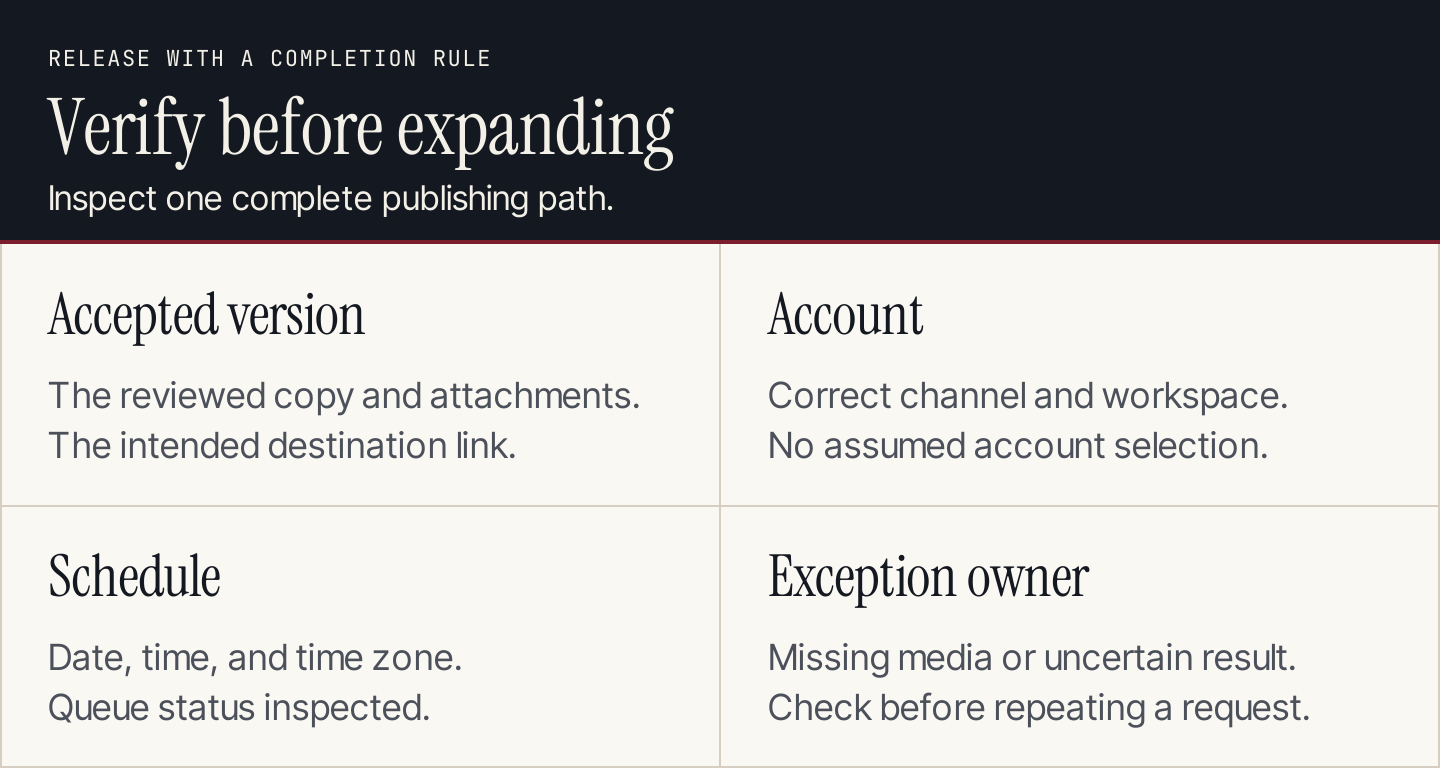
Treat destination checks and exception handling as part of publishing.
Test seven failure cases
Before making the workflow recurring, try these cases with permitted drafts or test destinations:
- Missing source: the assistant requests the material instead of inventing it.
- Changed source: an outdated draft is held for another review.
- Wrong account: the workflow stops before saving to an unintended destination.
- Missing attachment: the post remains incomplete rather than losing its visual silently.
- Unclear time zone: the release time is clarified before scheduling.
- Uncertain response: the destination is checked before a retry.
- Expired connection: the owner receives a failure record rather than a success message.
These tests assess the workflow you configured. They do not follow automatically from using an AI model or MCP connection.
Use Rankauto for the articles behind the posts
Social posts often point to a deeper resource. Rankauto finds customer searches, researches and writes blog articles in your brand voice, checks figures against sources, and adds images and SEO fields. Articles save as drafts by default.
Rankauto is $49 a month per website with 30 monthly articles pooled across sites. It publishes blog articles to supported websites; use your social publishing tool for channel adaptation, queues, and scheduled social posts.