Webinar Marketing: 6 Real Examples and a Complete Campaign Plan

A webinar gives people a reason to spend time with your expertise. The campaign around it needs to explain why that time is useful, make joining straightforward, and give the session a life after the live event ends.
That means planning more than a registration announcement. The topic, landing page, email sequence, partner promotion, live experience, and replay should work together.
This guide walks through the campaign with six real examples: Semrush, Search Engine Journal, Beefree, NP Digital, SCORE, and Buffer. You will also find a practical promotion calendar, editable email templates, a measurement worksheet, and six AI prompts.
The public examples were captured on October 7, 2026. Some document past events or archived promotion. They demonstrate visible campaign choices, without proving registration rates, attendance, or revenue results.
What is webinar marketing?
Webinar marketing uses an online session and its supporting content to attract a relevant audience, teach something useful, and support a defined business goal. That goal might be education, product adoption, lead generation, or a better-informed sales conversation.
Webinar promotion is the part that gets people to discover and register for the event. The wider campaign also includes attendance, follow-up, and repurposing.
Keep these stages separate when planning:
| Stage | Reader's question | Main content |
|---|---|---|
| Discovery | Is this relevant to a problem I have? | Topic-led posts, invitations, partner mentions |
| Registration | Is it worth my time, and how do I join? | Landing page, agenda, speaker context, form |
| Attendance | Where is the session, and what will I get from it? | Confirmation, calendar details, join reminders |
| Continued use | How can I apply or revisit the material? | Replay, handout, article, clips, relevant next step |
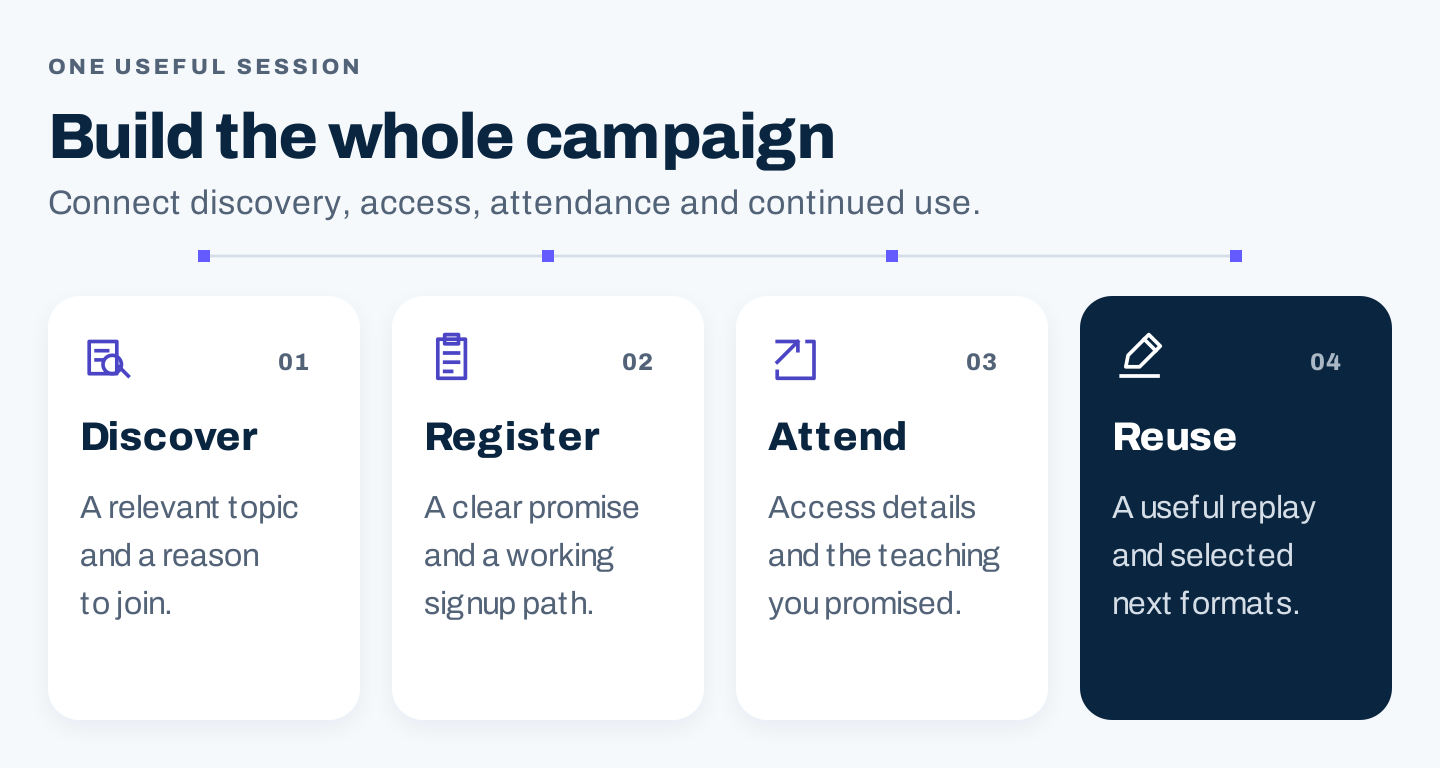
Original diagram: plan the useful content and next action at each stage of the campaign.
For a founder, a focused workshop can explain a recurring customer problem. For a marketing team, it can bring an existing topic or research project to life. For an agency, it can demonstrate a method while giving prospects a better basis for deciding whether they need help.
Start with one audience problem and a useful takeaway
Choose a problem you can teach with evidence, examples, or a demonstration. Pull candidates from repeated sales questions, support requests, customer interviews, and relevant search research.
A broad subject such as digital marketing is a category. A session about choosing which marketing activities to prioritize gives the audience a decision to work on.
Write the brief before creating the slides:
- Priority audience: Who has this problem now?
- Starting point: What do they already understand?
- Question: What decision or task will the session address?
- Takeaway: What can they use afterward?
- Demonstration: What will you show that an announcement cannot explain?
- Business goal: What relevant action would count as progress?
Use the takeaway to set boundaries. If the session promises a worksheet, allocate time to explain and apply it. If it promises a live demonstration, make sure the setup lets the speaker complete the work. A product pitch can be an appropriate format when it is described that way; an educational session should deliver the education it advertises.
Real example 1: Semrush makes the work visible in the promise
A Semrush webinar page about using Claude with its data describes two tasks: prioritizing content topics and investigating a page losing rankings. It also describes sharing prompts afterward.
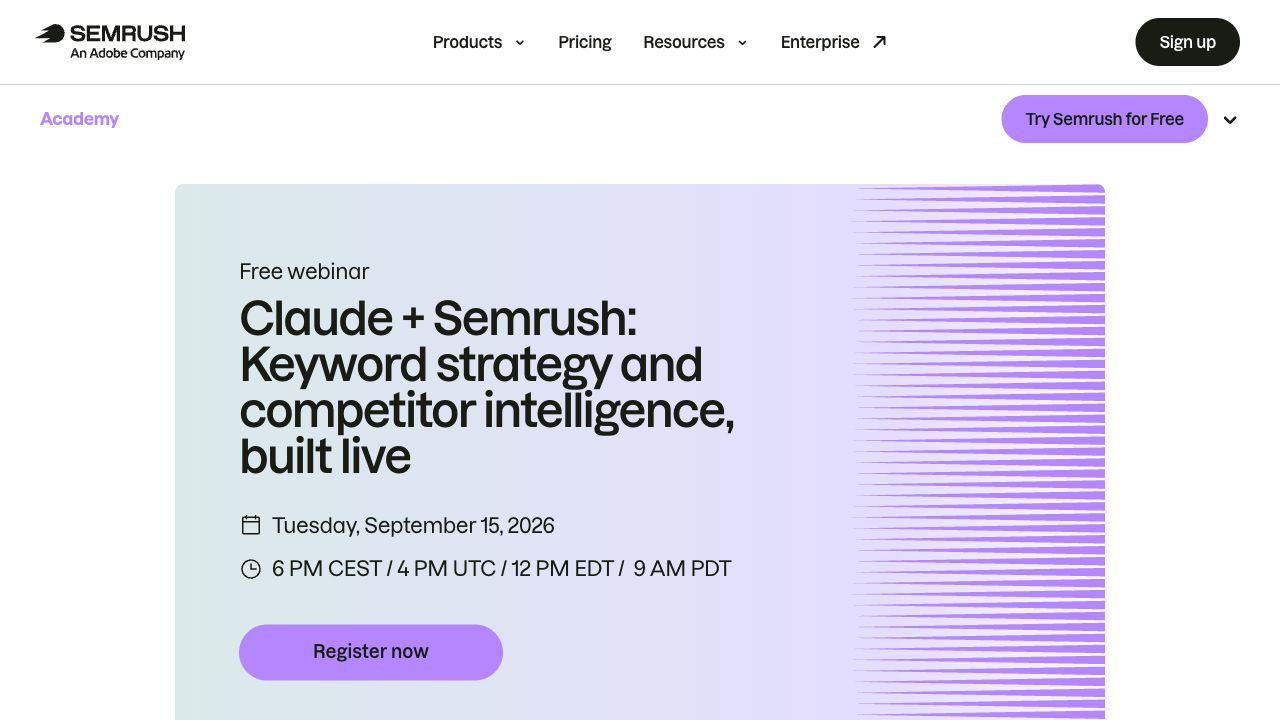
Source: Semrush, captured October 7, 2026 at 1280 × 720. The displayed event date is September 15, 2026.
The useful pattern is a promise connected to tasks and reusable material. Readers can assess whether those jobs are relevant to their work.
There is also a practical maintenance lesson: the captured page still displays a registration action after its stated date. Treat it as a historical event-page example, not an invitation to an upcoming session. For your campaign, assign someone to review the title, event status, CTA, and access instructions after the live date.
Build a registration page that answers the decision
The landing page should help someone understand the session before asking for their details. Put the following information where a visitor can find it:
| Element | What the reader needs |
|---|---|
| Title | A recognizable problem, task, or outcome |
| Description | Who the session fits and why it is useful |
| Learning points | Specific things covered, within the promised scope |
| Format and duration | Whether it is a workshop, demo, discussion, or recording |
| Date and time zone | An unambiguous live time, with relevant regional equivalents |
| Speaker information | Experience relevant to the actual topic |
| Registration action | What happens when the reader signs up |
| Replay policy | Whether a recording will be available and how to access it |
| Form | Fields needed for access and genuinely useful follow-up |
Write the title and agenda so they make sense together. Avoid promising a complete strategy when the session only demonstrates one step. Put technical requirements or preparation in the explanation if they affect whether someone can participate.
Use the form to collect information you will actually use. Every additional question needs a purpose. If a field helps route follow-up, agree who will act on it before adding it. Test the journey yourself: form submission, confirmation, calendar entry, join link, and replay access.
Real example 2: Search Engine Journal connects the topic, partner, and action
Search Engine Journal's link-building webinar page brings together an event topic, partner branding, a date, learning points, and a registration form. The page also says a recording will be sent to registrants who cannot attend live.
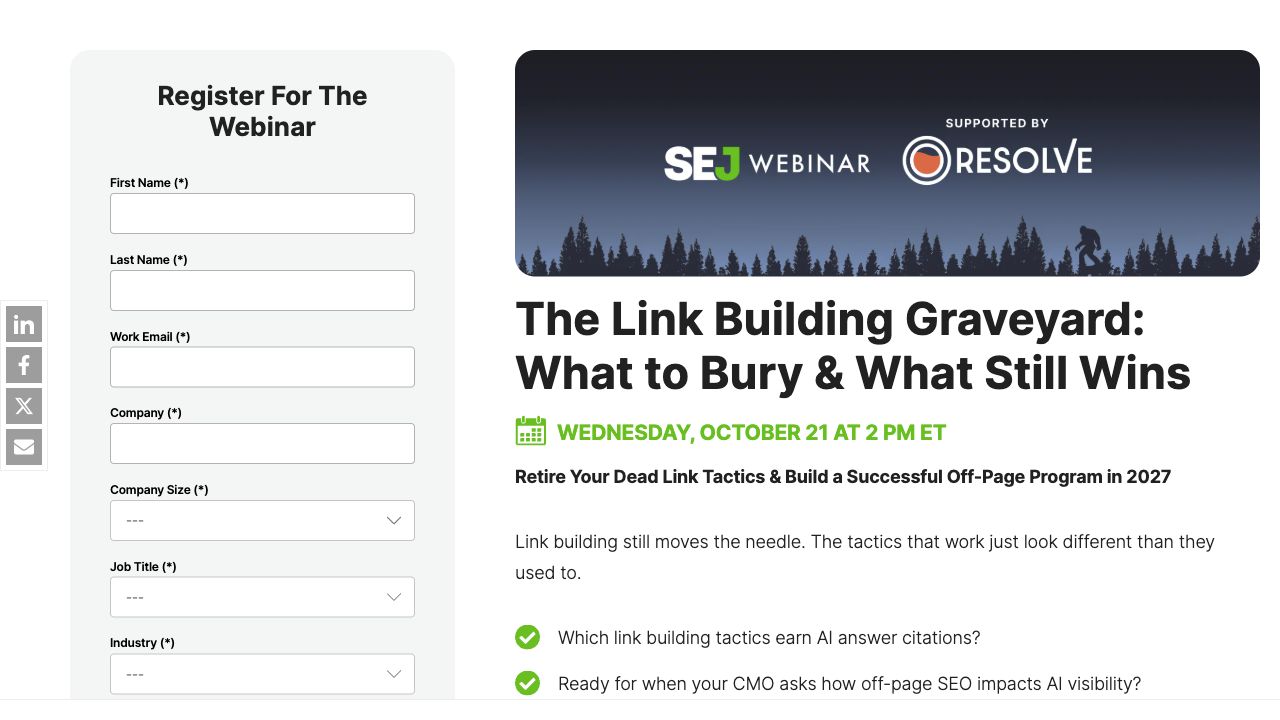
Source: Search Engine Journal, captured October 7, 2026 at 1280 × 720. The displayed live date is October 21; availability can change.
The pattern to learn from is consistency across the promise and the signup destination. A partner promotion can send readers to a page that explains the shared session and the access conditions.
The visible form also illustrates a tradeoff. More fields can collect qualification context, but they create more work for the registrant. Decide what your campaign needs rather than copying another organization's form.
Choose webinar promotion channels by audience access
Start with the places where you can reach relevant people and explain the topic credibly. Add channels when you have a clear role for them and the capacity to maintain the campaign.
| Channel | Useful role | What to prepare | Measure |
|---|---|---|---|
| Reach an interested existing audience | Segmented invitation with one registration action | Clicks and attributable registrations | |
| Organic social | Introduce the problem and speaker perspective | Several distinct angles with the same event facts | Relevant visits and registrations |
| Partners and speakers | Reach another audience with a shared need | Approved description, dates, creative, tracked links | Registrations by partner source |
| Website and blog | Connect existing interest to the session | Contextual links from relevant pages | Visits and registrations from those pages |
| Communities | Offer a resource relevant to an active discussion | Useful context and a permitted event mention | Qualified interest and registrations |
| Paid promotion | Test reach beyond your existing audience | Defined audience, spending limit, suitable destination | Cost per valid registration and later fit |
| Personal invitations | Invite someone whose current problem matches | A specific reason the session might help | Responses and relevant attendance |
For a small team, a useful starting combination is the registration page, relevant email, speaker or partner promotion, and a small set of social posts. This is a planning choice, not a universal best-performing mix.
Email: give each invitation a different reason to register
Use the first message to explain the problem and takeaway. A later message can show one agenda item or introduce the speaker's relevant experience. A final invitation can remind people of the actual date and the live participation opportunity.
Suppress registrants from further registration invitations where your system supports it. They need access information next. Univid's promotion guide describes the distinction between invitations for non-registrants and reminders for people already signed up.
Do not rely on changing the subject line while repeating the same vague body. Each message should help a reader make the decision.
Real example 3: Beefree combines a topic, application, and RSVP
An archived Beefree invitation on Really Good Emails presents email design trends, explains their application to campaigns, and gives a date, time zones, and RSVP button. It names the collaboration with Really Good Emails.
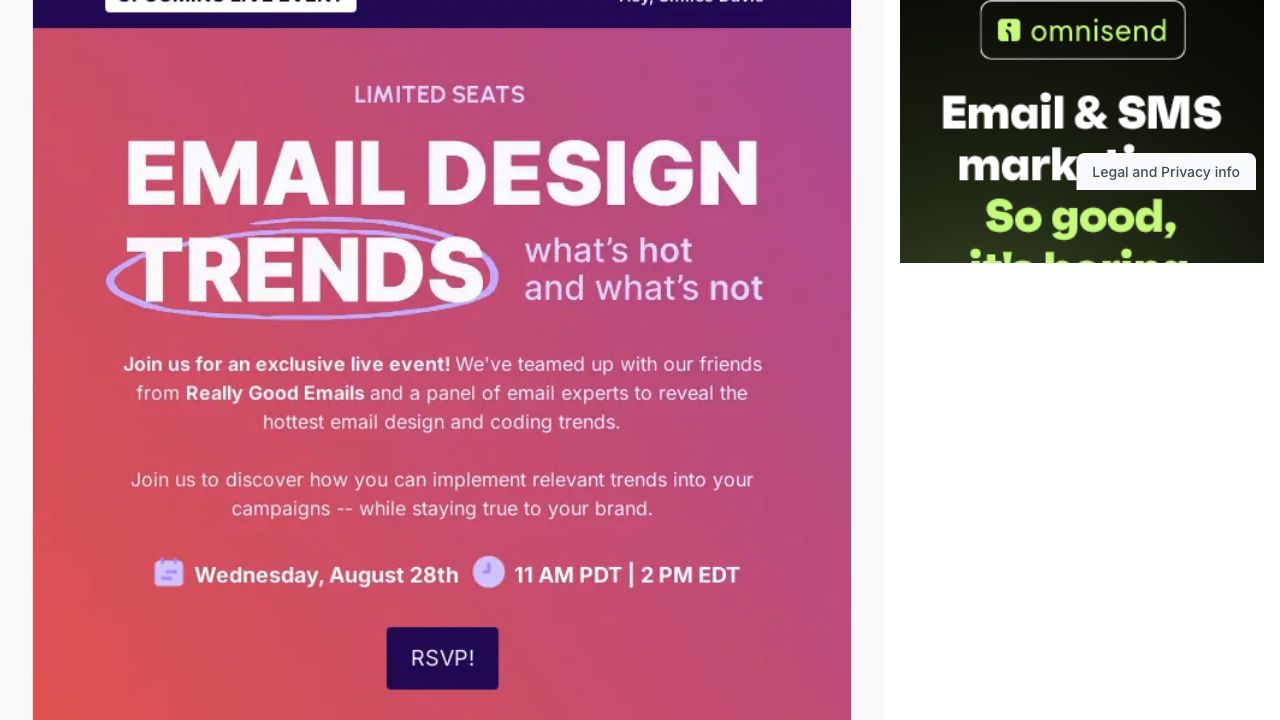
Source: Really Good Emails' Beefree archive, desktop excerpt captured October 7, 2026 at 1280 × 720. This is archived creative, not an upcoming event.
The transferable pattern is the order of information: topic, why it matters, logistics, action. The image makes the theme recognizable, while the explanation gives the reader a reason to care.
Use that information sequence in your own voice. The archived urgency wording is a published claim; our screenshot does not establish the event's capacity, email delivery, or campaign results.
Social: vary the teaching angle
Plan posts around different questions: the problem, one useful idea, the speaker's approach, a question attendees can bring, and the practical takeaway. Keep the title, date, time zone, and registration link consistent.
A speaker's post can explain why the topic matters from their experience. A company post can show the agenda or handout. Use the channels your audience already engages with; an industry label alone does not tell you which network will work.
Partners and communities: make the fit explicit
Choose a partner whose audience has the same problem and whose expertise adds to the session. Agree the topic, responsibilities, promotional timing, tracked links, and follow-up ownership.
Supply a short description, approved event facts, speaker details, and creative in useful formats. Ask the partner to adapt the message to their audience while preserving those facts. Community promotion needs similar care: explain the resource's relevance and follow the community's posting rules.
Content, paid ads, and retargeting: connect interest to the same promise
Add a contextual event link to relevant existing articles, resources, or product education. A reader already investigating the problem has a reason to consider the session. A new supporting article should answer something useful itself rather than functioning only as an advertisement.
For paid promotion, define the audience, budget limit, and registration measure before starting. Test the destination and source tracking. Compare cost with the relevance of the resulting audience; cheap registrations alone do not establish campaign value.
If retargeting fits your setup, choose an audience with relevant prior interest, exclude registrants where possible, and stop registration ads when the event ends. Then change the message and destination if you continue promoting a replay. Confirm the platform's actual audience and suppression behavior rather than assuming the settings worked.
Use a realistic promotion calendar
This four-week calendar is an editable starting plan. Adjust it for your audience, partner lead time, list expectations, and production capacity. A recurring session for existing customers may need a different schedule from a first event with an unfamiliar audience.
| When | Main action | Audience | Deliverable |
|---|---|---|---|
| Four weeks before | Finalize the brief, speakers, platform, and page | Internal team and partners | Approved scope and tested registration journey |
| Three weeks before | Launch the invitation and partner promotion | Relevant non-registrants | Email, social introduction, partner kit |
| Two weeks before | Explain one useful lesson and the agenda | Interested prospects | Topic-led post or article, second invitation |
| Final week | Address remaining questions and confirm delivery | Non-registrants and internal team | Focused final invite, rehearsal, working assets |
| Day before | Send access reminder | Registrants | Join link, correct time, preparation |
| Shortly before | Send a concise join reminder | Registrants | Direct access instruction |
| Event day | Deliver the promised teaching and participation | Attendees | Session, Q&A, clear next step |
| After recording is ready | Send replay and promised resources | Attendees and no-shows, separately | Reviewed replay page and follow-up |
| Following weeks | Publish selected reusable material | Relevant wider audience | Article, clips, resource, updated event page |
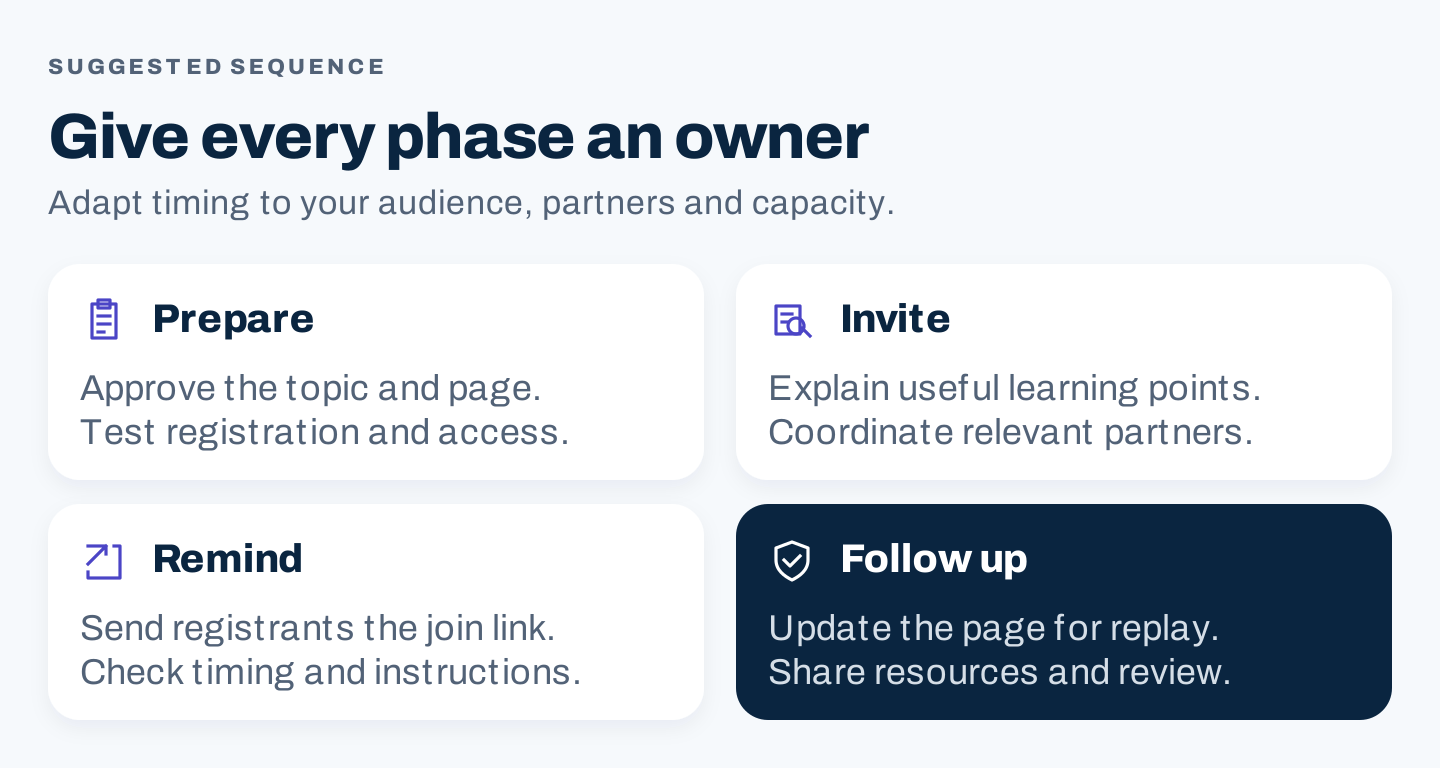
Original diagram: a suggested campaign sequence. The detailed calendar above is editable; timing is not a performance benchmark.
Assign an owner and deadline to each deliverable. Put the replay page update and advertising stop date on the calendar before the launch. They are easy to overlook when the team is focused on the live session.
Turn registrations into a clear attendance journey
The confirmation should answer whether signup worked and what happens next. Include the title, live date and time zone, access instructions, and calendar option. If a unique join link is involved, make its location clear.
Before the event, test access using the same instructions a registrant receives. Check mobile readability, calendar times, and whether the join link leads to the correct session. Confirm who will handle access problems during the live event.
Vimeo's promotion guide distinguishes registration invitations from attendance reminders and separates follow-up for attendees and no-shows. That is a useful campaign distinction to retain even when your timing and tools differ.
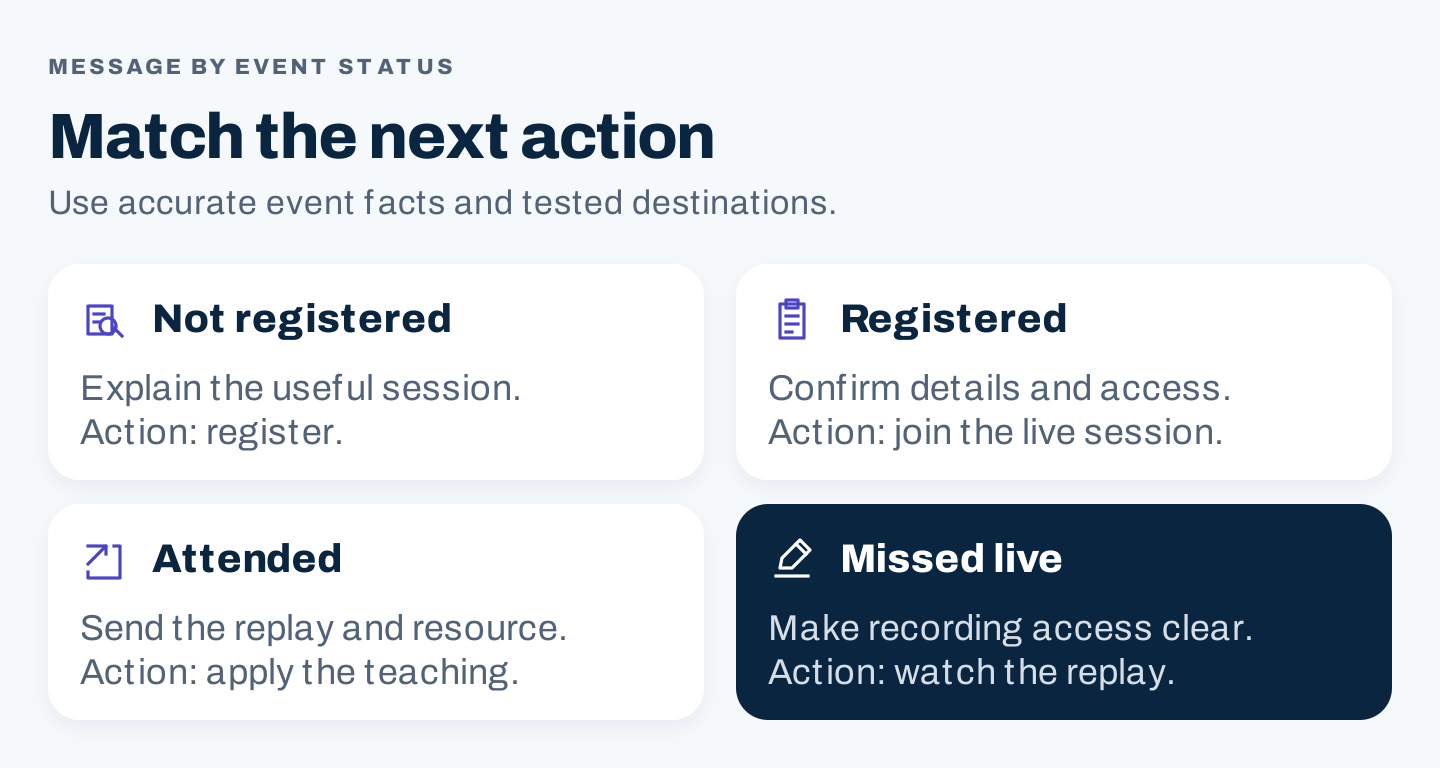
Original diagram: route messages by the person's event status and the next action they need.
Four editable email templates
These are original templates for your verified event facts. Fill the brackets, then check the links and conditions before sending.
Invitation: for relevant people who have not registered
Subject: A practical session on [specific customer task]

If you are working on [situation], join [speaker] for [session title].
We will demonstrate [approved activity] and explain [useful lesson].
You will leave with [confirmed takeaway].

[Date], [time and time zone] · [duration]
[Accurate live participation and replay information]

Register: [registration link]
Confirmation: after successful registration
Subject: Your registration for [session title] is confirmed

You are registered for [title] on [date] at [time and time zone].
Add it to your calendar: [calendar link]
Join instructions: [verified access details]
Preparation, if needed: [instructions or omit]
Questions about access: [support route]
Join reminder: for registrants
Subject: [Session title] starts at [time and time zone]

Here is your access link for today's session: [join link]
We will cover [brief approved scope].
[Any necessary access instruction]
Replay follow-up: adapt for attendance status
Subject: The [topic] recording and [promised resource]

[Attendees: Thank you for joining the session.]
[No-shows: The recording is ready when you have time to watch.]
Replay: [working replay page]
Resource: [working handout or worksheet link]
Start with [checked chapter or section] for [relevant task].
[One useful optional next step, with an accurate destination]
Keep a reminder's action different from an invitation's action. A registrant should not have to repeat registration to discover how to join.
Plan the live experience around the promised takeaway
Use a short run of show that names what happens, who owns it, and what can be removed if time runs short. Give the teaching or demonstration the space the landing page promised.
For a planned 45-minute workshop, an editable allocation could be five minutes of context, 25 minutes of demonstration, ten minutes of questions, and five minutes for applying the takeaway and closing. These are proposed timings, not observed performance data.
Use a poll, question, or exercise only when it contributes to the topic. Have a moderator collect questions and identify those the speaker can answer responsibly. Record unanswered questions for later content. Avoid turning every response into a sales pitch.
Choose a next step that fits the goal: use a worksheet, view a related tutorial, try the demonstrated workflow, or request help when that is relevant. Decide how to present it clearly without interrupting the useful work people came for.
Make the replay a useful destination
Update the event page after the session. Replace the live registration language with accurate recording access, keep useful learning points and speaker context, and make any form requirement clear. Remove expired countdowns and stop campaigns sending people to an obsolete signup promise.
Real example 4: NP Digital makes on-demand status visible
The captured NP Digital AI SEO event page labels the session on demand and uses a watch action. Its public page also lists instructors and a form for access.
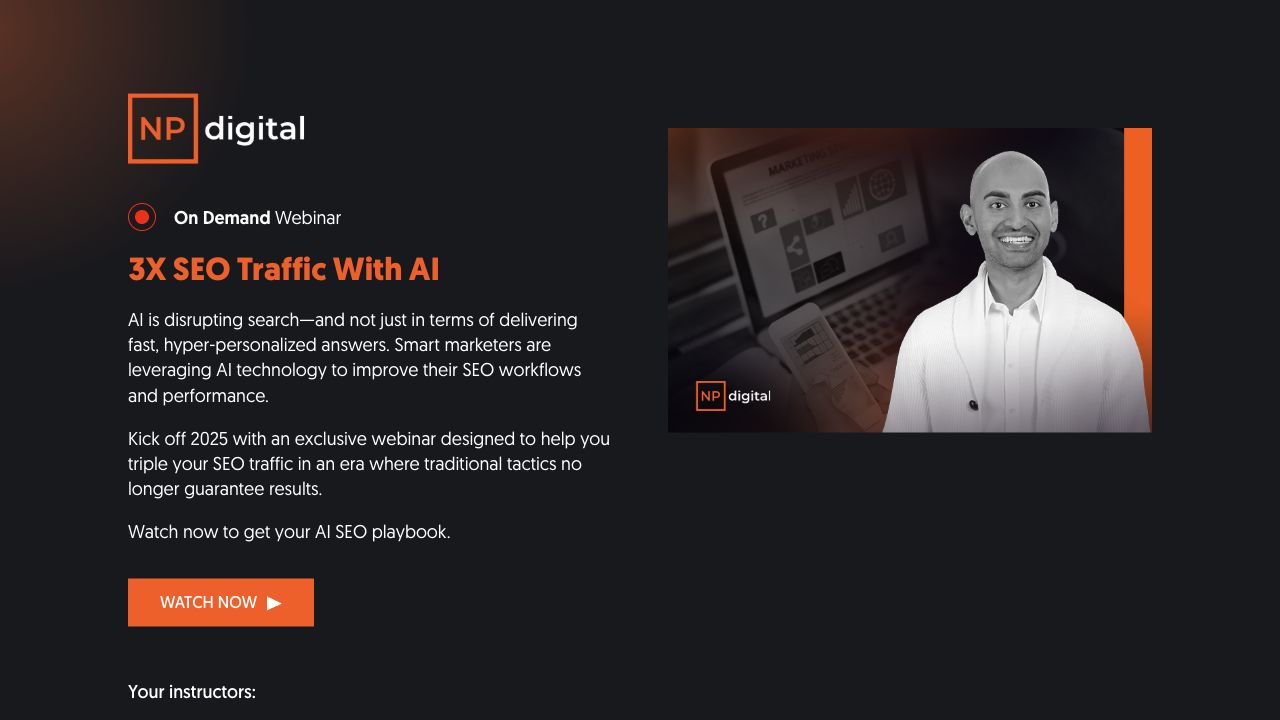
Source: NP Digital, captured October 7, 2026 at 1280 × 720. The numerical traffic promise is the publisher's promotional claim, not a measured result established here.
The useful design decision is clear event status. A visitor can distinguish recording access from attending an upcoming live session.
Apply that distinction without adopting the page's outcome claim. Check whether your watch action provides immediate playback, opens an access form, or requires another step. Describe the actual path and test it before promoting the replay.
Real example 5: SCORE keeps the session and handout together
SCORE's digital marketing plan page labels the session a recorded webinar. The page retains its original date, duration, presenter context, a view action, and a presentation-deck link.
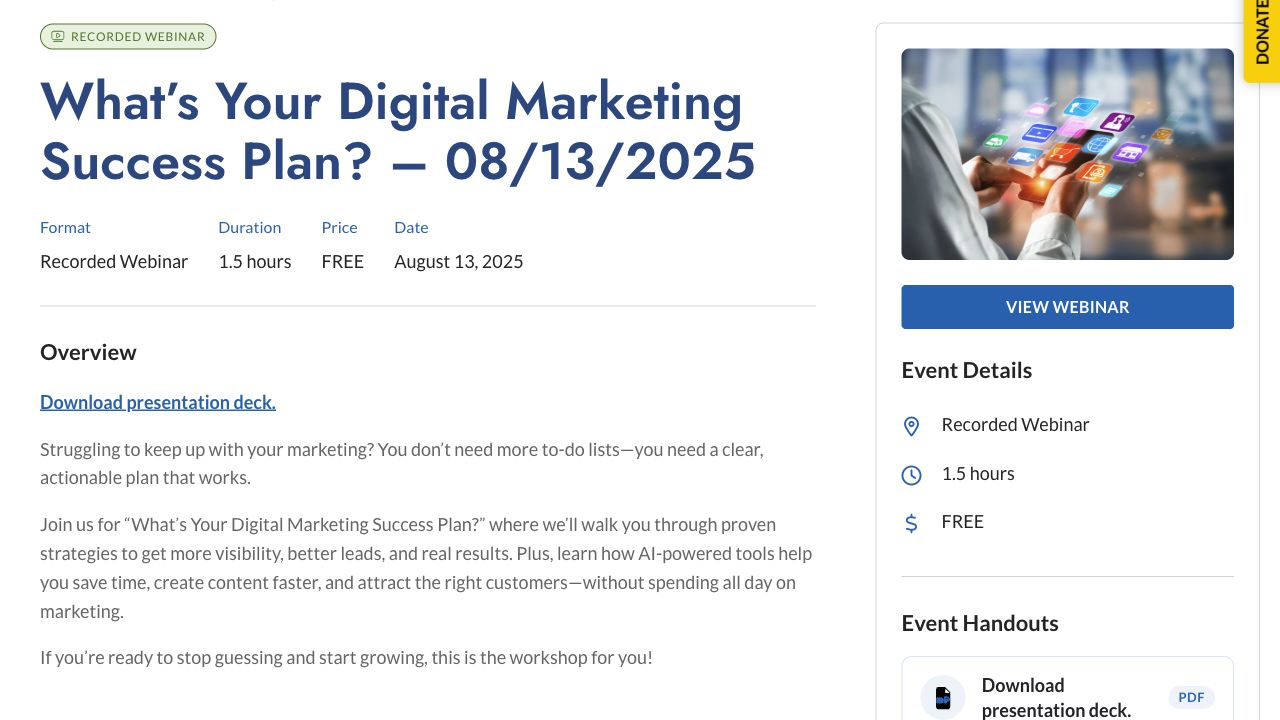
Source: SCORE, desktop excerpt captured October 7, 2026 at 1280 × 720. The original event date is August 13, 2025.
The pattern to borrow is the combination of recording context and practical resources. Someone who finds the page later can understand what it covers and locate the supporting material.
Keep the recording date visible when the topic can change over time. Check handout links and identify sections that need updating before giving an old session a new promotional push. The public view action does not, by itself, prove unrestricted access to the video.
Repurpose the teaching, not just the recording link
Select the material worth revisiting. A recording can support several formats, but each should help someone complete a task without forcing them to reconstruct the live session.
| Source material | Useful derivative | Editing needed |
|---|---|---|
| A complete explanation | An article answering one specific question | Context, headings, sources, updated facts |
| A self-contained demonstration | A short video clip | Setup, readable visuals, captions, correct destination |
| A repeatable process | A worksheet or checklist | Instructions, fields, boundaries, example of use |
| Audience questions | An FAQ or follow-up article | Accurate answers and explicit unresolved questions |
| One supported insight | A social post or email | Enough context to preserve the meaning |
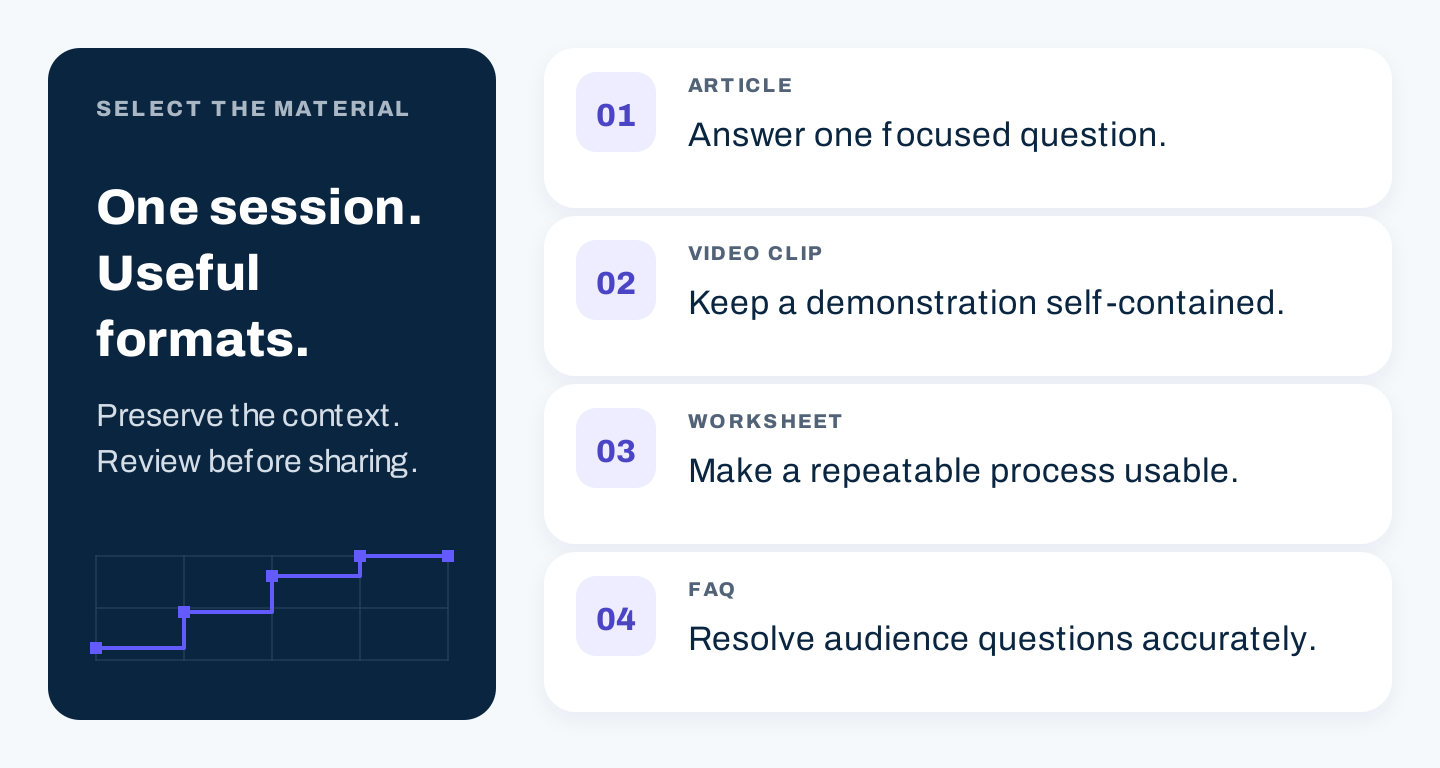
Original diagram: choose a useful derivative for each piece of material; one session does not require every format.
Real example 6: Buffer turns a webinar into a standalone guide
In a 2014 Buffer article about writing tweets, the introduction identifies a webinar co-hosted with Twitter. It organizes the subject into written sections and points readers to slides and the video presentation.
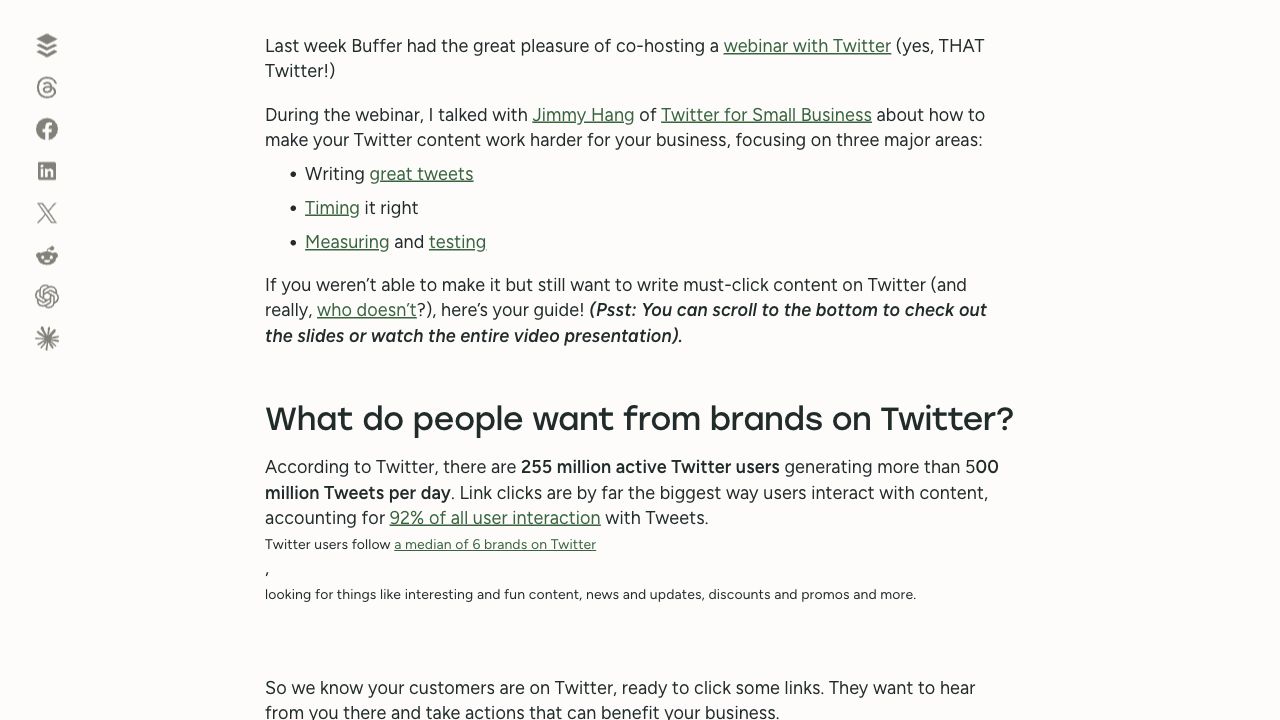
Source: Buffer, desktop excerpt captured October 7, 2026 at 1280 × 720. The article is dated May 6, 2014; figures visible below the introduction are historical, not current platform benchmarks.
The enduring lesson is the content format: someone who did not attend can still use a written explanation and locate the original material.
For your own article, verify claims against the recording and current sources. Remove references that only make sense live, add screenshots where they teach the process, and preserve the speaker's meaning. Do not treat old platform advice as current merely because the page still loads.
Measure the campaign with consistent definitions
Choose the primary measure from the goal. A training session may focus on useful participation or adoption. A lead-generation session may focus on qualified next steps. Keep registration and attendance measures as separate parts of the explanation.
| Metric | Definition for your worksheet | Question it helps answer |
|---|---|---|
| Valid registrations | Unique people successfully registered, excluding tests and duplicates | How many people committed? |
| Page registration rate | Valid registrations ÷ eligible page sessions, for the same period and scope | How did this measured page journey perform? |
| Live attendance rate | Unique live attendees from the registration cohort ÷ valid registrations | How many registrants joined live? |
| Replay viewers | Unique recorded viewers within a defined reporting window | How much later use was recorded? |
| Cost per paid registration | Paid media spend ÷ valid registrations attributed to that paid campaign | What did acquisition cost on this basis? |
| Qualified next steps | Unique people taking the predefined relevant action | Did the session support the business goal? |
Report a ratio as a percentage only where appropriate. Use N/A when the denominator is zero or unavailable. Define which attendance threshold and reporting window you use, and disclose untracked access. Count people who attend live and watch a replay once when reporting unique combined viewers.
For example, illustrative arithmetic, not a real campaign: 80 unique live attendees from a cohort of 200 valid registrants gives a 40% live attendance rate. If 50 people later watch the replay and 20 also attended live, combined unique viewers are 110. That calculation does not establish whether the campaign was successful; audience fit and the goal still matter.
Use consistent campaign names and source tags for owned channels, partners, and paid promotion. Record how attribution is assigned. A platform-reported registration and a last-click analytics registration can differ; they should not be silently added together.
After the event, locate the problem before changing the campaign. Low relevant traffic points toward distribution or topic fit. Visits without registrations suggest reviewing the promise, destination, or form. Registrations without attendance call for checking access, timing, reminders, and expectations. Attendance without useful next steps may indicate a mismatch between the teaching and the business goal.
Six AI prompts for the webinar campaign
Supply verified event facts, customer evidence, and speaker material. Keep AI-generated drafts separate from approved messages until someone checks them. The prompts below produce planning work, not permission to send or publish.
1. Choose a source-grounded topic
Use only the customer questions and research below to propose webinar
topics. For each, identify the audience situation, task to teach,
source IDs, demonstration needed, takeaway, and unanswered questions.
Keep the proposed scope feasible for [duration]. Do not invent demand,
search volume, customer quotes, or a performance promise.

Evidence with source IDs: [insert]
Our expertise and available demonstrations: [insert]
2. Audit real event pages with AI research
Review these event pages for topic, audience, agenda, speakers,
event status, date and time zone, CTA, form, and replay information.
Separate visible facts from editorial interpretation. Include URL
and verification date for each observation. If browsing is available,
open each page; if access fails, mark it unverified. Do not infer
attendance, conversion, or email automation from a public page.

Pages and captured excerpts: [insert]
Our intended session: [insert]
3. Draft the registration message
Write a registration-page draft using only the approved brief.
Include title, audience fit, three learning points, speaker context,
logistics, replay policy, and an accurate next action. Trace each
factual promise to a brief field. List missing information separately.
Do not invent dates, credentials, capacity limits, or outcomes.

Approved brief and facts: [insert]
Voice and destination: [insert]
4. Build promotion and reminder paths
Create a campaign calendar with owner, deadline, audience status,
channel, message purpose, asset, and destination. Separate invitations
for non-registrants from confirmation and join reminders for registrants.
Draft distinct topic, demonstration, speaker, and final-date angles.
Keep every date, time zone, title, and replay condition identical.
Flag platform behavior we must test rather than assuming automation.

Approved event facts, channels, and capacity: [insert]
5. Repurpose the reviewed transcript
From this transcript, propose a focused article, two self-contained
clips, and a useful worksheet only where the material supports them.
Give timestamps, source passages, context needed, and facts to verify.
Separate exact speaker quotations from paraphrases. Do not invent
research, examples, demonstrations, or answers to unresolved questions.
Preserve limitations when shortening an explanation.

Reviewed transcript with timestamps: [insert]
Audience and approved source material: [insert]
6. Interpret the campaign report
Review this report using the definitions supplied. Check date ranges,
cohorts, duplicate people, source attribution, and denominators.
Use N/A for zero or missing denominators. Separate observations from
possible explanations. Recommend one investigation or change per
identified problem. Do not invent results, industry averages, causal
claims, or revenue attribution that the records cannot establish.

Goal, metric definitions, and report: [insert]
Known tracking gaps: [insert]
Copyable webinar campaign worksheet
Use this as the shared campaign brief. The blank cells are for your team to complete.
| Field | Decision to record | Your answer |
|---|---|---|
| Audience and situation | Who needs the topic now, supported by which evidence? | |
| Goal | Which useful business outcome will you measure? | |
| Promise and takeaway | What can the session responsibly teach and deliver? | |
| Format and logistics | Duration, speakers, live date, time zones, preparation | |
| Page and signup | URL, form fields, confirmation, access test owner | |
| Promotion | Channels, audience segments, distinct angles, tracked links | |
| Partners | Contribution, promotional timing, approved facts, ownership | |
| Reminders | Registrant path, tested join links, support route | |
| Live delivery | Run of show, moderation, questions, relevant next action | |
| Replay | Page update, access conditions, handout, follow-up owner | |
| Reuse | Selected article, clips, worksheet, or FAQ with review needs | |
| Reporting | Cohort, window, definitions, tracking gaps, next decision |
Start with the promise, access journey, and follow-up. Once those work, expand the distribution plan. A larger campaign is useful only when your team can maintain its facts, destinations, and audience paths.
Webinar marketing FAQs
How far ahead should we promote a webinar?
Allow enough time for production, partner coordination, and more than one useful invitation. The four-week calendar in this guide is a starting plan. Adapt it to the audience and event rather than treating a particular number of weeks as a guarantee.
How do we promote a webinar without a large email list?
Choose a focused audience problem and a partner or speaker with a relevant audience. Connect the session to useful public content and appropriate communities. Test a smaller campaign before assuming that paid reach will solve an unclear topic.
Should the replay be gated?
Decide from the campaign goal and actual follow-up needs. Open access may make education easier to share; a form can collect context for relevant follow-up. Make the access requirement clear and test the journey you promote.
What is a good webinar attendance rate?
Compare events using the same definition, audience, and reporting window. A figure that combines live and recorded viewing is different from live attendance alone. Your own comparable events provide a more useful starting point than an unexplained universal percentage.
How many pieces of content should one webinar produce?
As many as the useful material and your editing capacity support. Start with the replay and promised resource, then choose derivatives that answer a specific question. Repetition across several formats does not make the content more valuable by itself.